Office 2021 is the personal and small business ‘perpetual licence’, non-subscription version of Microsoft Office. For Windows and Mac.
Office LTSC (Long Term Servicing Channel) is the volume licence ‘perpetual licence’, non-subscription version of Microsoft Office for organizations, companies and governments. Also for Windows and Mac.
The features in Office 2021 and Office LTSC are very similar, if not the same.
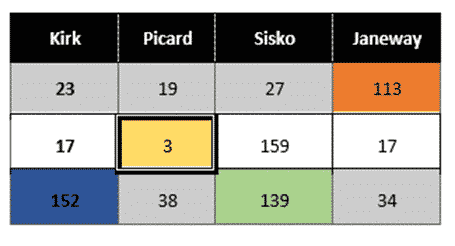
Workaround for styles with table cells in Word
There’s a limitation in Word’s Table Styles; no individual cell styles within a Word table We’ll explain the problem and several options to workaround it. Along the way it’s a chance to dig into some interesting parts of Word and Office and make them do things that might not have occurred to you. There’s a […]

Simple Drop Caps in Word
The Drop Cap function in Microsoft Word provides a simple way of capturing the ornate look of an old book or manuscript. There are many options that can be used to change the look, positioning and behavior of any drop cap to suit your formatting needs or taste. Drop Caps have been in Microsoft Word for many versions, at […]

Easy to see Text Cursor choices in Windows 11 and 10
Windows lets you make the text cursor stand out on your screen. Additionally, you can edit the text cursor thickness to improve its visibility in Word, Outlook and anywhere you type. Changing the cursor is especially helpful in finding your place in Word. With the optional Text cursor indicator preview, the typing position is very […]
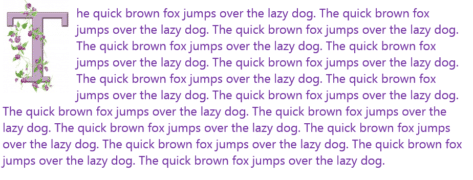
Extra Drop Cap trick using online pictures in Word
If you want even more flair with your Microsoft Word drop cap letters, why not take advantage of the Microsoft online images range? See Simple Drop Caps Word for the basics of Word Drop Caps and Fancy Drop Caps in Word for a lot more. Click where you want a drop cap letter to appear and navigate to “Insert […]

Add opening and closing music for a PowerPoint presentation
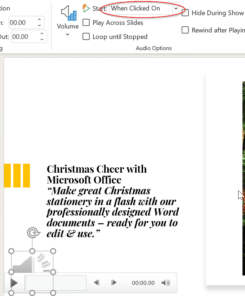
Would you like some music to play before your PowerPoint ‘show’ begins? Most people do this by playing music separately from PowerPoint then clumsily switching over when they start speaking. There’s a better way. The more elegant method is adding repeating music to an opening slide. Add the audio file then change these options on the ribbon at […]
Play audio only when clicked on a PowerPoint slide
Audio on a PowerPoint slide can be played when you click on the audio icon on a slide. Choose the audio icon then on the Playback pane, choose Start: when clicked on. You can have multiple audio tracks on a slide, each one plays when you click. This slide has two sound effects for either a correct or […]

How to save $50 buying Office 2021 Home and Student
Amazon is selling Office 2021 Home and Student for $50 off the regular price. There’s also a discount on Home and Business (including Outlook). Office 2021 is the latest perpetual licence or non-subscription version of Microsoft Office. It was released only a few months ago. Office 2021 Home and Student The Home and Student bundle […]

Microsoft’s waffle about the Office ‘new look’
The Coming Soon pane in Office 365 is supposed to help people use upcoming features. For the interface changes, the pane is just marketing waffle and misdirection straight from an advertising copywriters desk. Click on the Coming Soon megaphone shows this pane with the option to “Try the new experience” There’s nothing in the text […]
Approximately Equal or image of ≒ in Word and Office
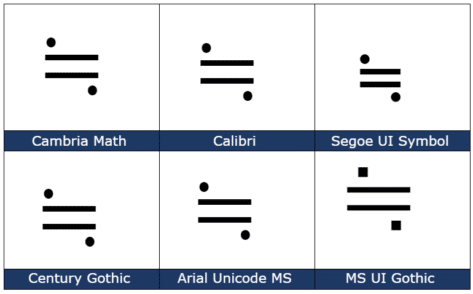
How to insert the Approx Equal or the image of symbol ≒ into Microsoft Word, Excel, PowerPoint or Outlook. Both in Office for Windows and Office for Mac. Approximately Equal To or the Image Of ≒ symbol is commonly used Japan, Korea and Taiwan to indicate two values are approximately equal, but not exactly equal. How Approximately Equal ≒ looks in different fonts. Here are some examples […]

Really fancy and clever Drop Caps in Word
Drop Caps are very old fashioned, there’s space left for them in the oldest printed books in the world, the Gutenberg Bibles. You can do the same thing, a lot more easily, in Microsoft Word. In this Office-Watch.com article we’ll go beyond the simple ‘how to’ for Drop Cap. There’s the basic settings supplied by […]
Fast typing the same thing across many Excel cells
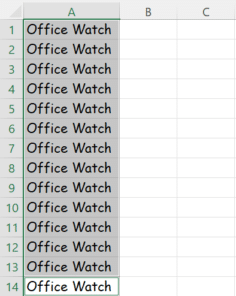
Sometimes when you are filling out the cells in an Excel worksheet, the same thing must be written repeatedly. There’s a fast way to do it using a surprising Excel shortcut. Luckily, there’s an easier shortcut around it. Previously we have spoken about Auto Fill hidden tricks in Excel, but you might not be aware of this simple trick. Firstly, […]

Common Sound effects for PowerPoint
A PowerPoint presentation sometimes needs that extra oomph, such as an occasional sound effect. Here are a few common ones that you’ve heard from movies and TV shows. You can use them as a trigger sound, or novel background noise. It’s all about the sounds: Wilhelm Scream – stock sound effect used in several TV shows and movies, originally from the […]

Nine hidden tricks for Auto Fill in Excel
Typing or formatting cells of repetitive data can be very boring, but Excel has an Auto Fill feature to make it easier by automatically filling in data for you. We thought we knew Auto Fill, but just found nine surprising and useful tricks. Auto Fill goes beyond simple incrementing numbers or dates which is what […]
Print selected part from a Word document
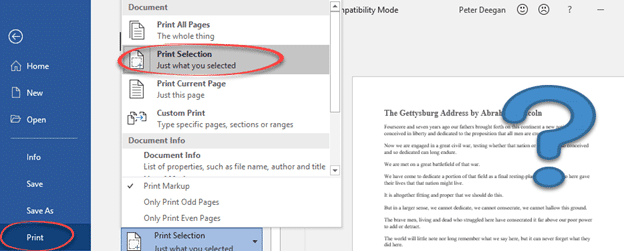
Microsoft Word can print the selected parts of a document, not just the whole document, Select the part of the document you want to print. Word won’t let you print separated selections (made using the Ctrl key). Go to File | Print (or Ctrl + P) and from the Settings list choose Print Selection. The […]
New Prime Number is too big for Excel
In 2013 they discovered a new Prime number but not for Excel. The GIMPS project has discovered a new prime number – that’s a number that can only be divided by itself and one. The new arrival is a bouncing bonny number 257,885,161-1 which is 17 million digits long. Prime numbers aren’t just mathematical curiosities, they […]

Solving “There’s already an account …” Microsoft login problem
Trying to login to Microsoft can get into a strange loop being told “there’s already an account” but then “That Microsoft account doesn’t exist.” for the same address! Amazingly both messages are right but not well worded. How can a Microsoft account login (email address) both exist and not exist at the same time? Has […]