Office 2021 is the personal and small business ‘perpetual licence’, non-subscription version of Microsoft Office. For Windows and Mac.
Office LTSC (Long Term Servicing Channel) is the volume licence ‘perpetual licence’, non-subscription version of Microsoft Office for organizations, companies and governments. Also for Windows and Mac.
The features in Office 2021 and Office LTSC are very similar, if not the same.

Beware, your location can affect Map Charts in Excel
Microsoft changes what’s displayed in Excel Map Charts depending on your location and Microsoft’s policies in certain countries like China. We’ve had reports from people in China and Hong Kong that they can’t ‘see’ Taiwan on their Excel Map Charts. In most of the world, China and Taiwan show up as separate areas. Microsoft, like […]

Typing Numero and other symbols in Office
How to type the ‘Numero’ symbol and other special characters – there’s many ways to do it in Word and Office. It all started with a single, seemingly simple, question from a reader. As often happens, the question opens up a whole range of options in Office Entering the Numero sign “How can I enter the […]
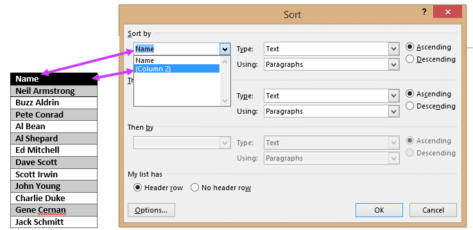
Sort by hidden column in Word
How to sort a list using a hidden or unseen column in a Microsoft Word table. Sometimes you want to sort a list in a way that isn’t apparent to the reader. To continue our Apollo theme, here’s a list of the twelve men who walked on the moon with the order they stepped onto […]

How to hide a column in Word
You can hide a table column in Word, all it takes is a little trickery and ignoring Microsoft’s advice! Sometimes you want to hide a table column in a Word document but according to Microsoft you can’t do it. Here’s how to do it anyway. It’s true that there’s no explicit ‘hide column’ option like […]
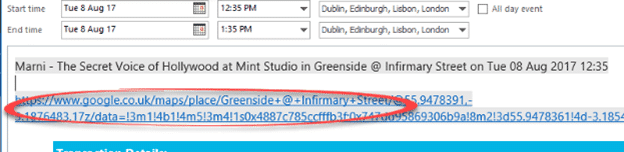
Make Google Maps work with Outlook appointments
Google Maps is invaluable for getting around, especially in an unknown city. Corporate rivalry means there’s no proper integration between Microsoft Outlook and Google Maps There’s not even a mapping button in the Outlook appointments view. Contacts have a ‘Map it’ button but not ‘Location’ in an appointment – for reasons passing understanding. Our workaround […]

Excel Map Charts are way overdue for fixes
A few annoying things in Excel 365 / 2019 / 2021 / LTSC Map charts that Microsoft should fix. We’ll explain the traps and some workarounds. Making our COVID-19 Vaccination workbook reminded us of some anomalies in Excel Map Charts. Always check the Map area options Whenever using the Map Chart feature, always go to […]

More great Word tricks with Find
We’ve all seen the standard Find/Replace in Microsoft Word, either the ‘new’ pane or the older dialog box. Like so much else in Word, there’s a lot more available than the obvious features. Here’s a look at some of tricks. Press Ctrl + F to start a Find. In recent versions of Word, the Navigation […]

Six useful Replace tricks in Word
Microsoft Word’s Replace does a lot more than just replacing one bit of text for another. It can quickly change formatting, enforce a style, paste from clipboard and use special characters. You’re probably familiar with the basics. Press Ctrl + H to open the Replace dialog. Type in the text to look for ‘Find what’ […]
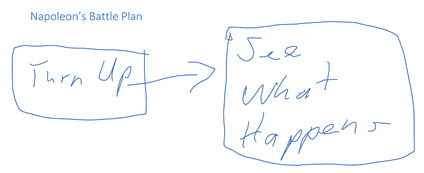
Drawing in all sorts of places Microsoft Office apps
Microsoft has been getting serious about drawing features in Office so we thought it was time to look at what’s available and possible across all the Office applications. Word, Excel, PowerPoint and some nice drawing stuff in OneNote Once upon a time, drawing onto a Word document or Excel worksheet was only possible with a […]
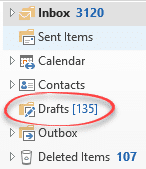
Share Draft Outlook emails on Apple, Android and desktop
Make a draft email on a phone or tablet (maybe some quick notes) to later revise and send from Outlook for Windows/Mac. Once that was a problem but not any more, as long as you’re using Outlook mobile apps. Syncronizing the Drafts folder is really useful. You can write a partial message or reply on […]
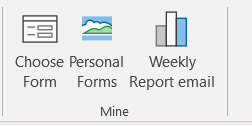
Faster ways to Outlook’s Choose Forms or Templates
Getting to Outlook Forms and Templates is a hassle, hidden deep down in the menus. It’s possible to bypass all those clicks and open the Choose Form dialog directly and even a specific library. See Email templates give you faster messages in Outlook The published way to access templates and forms is long-winded, Home | […]
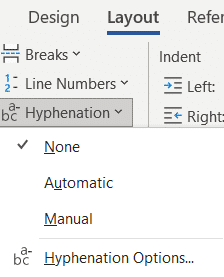
Hyphens and Hyphenation, all the options in Word
Hyphenating words in Word has many choices; manual, optional, compulsory (non-breaking) and fully automatic. Manual Hyphen The simple one we all know. Type the – on the keyboard (properly known as the Hypen-Minus) to hyphenate a word, e.g. choreo-animator. See Of hyphens, em-dash, en-dash and more Automatic hyphenation Word will hyphenate long words when they […]
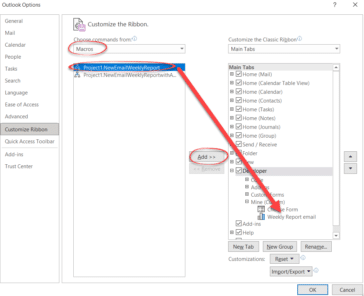
Faster ways to make a new email with Outlook template file
Here are four different ways to make a new email from an Outlook template file without the hassle of going deep into Outlook’s menus. You can choose to start a template based message from Windows or a button inside Outlook. See Email templates give you faster messages in Outlook for the basics on Outlook email […]
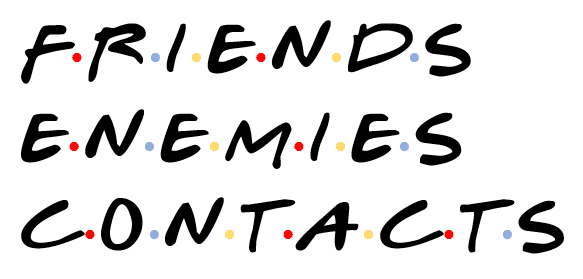
‘Friends’ logo or text complete in Word, PowerPoint and Office
Here’s how to add a taste of the logo or text from ‘Friends’ sitcom to a Word document, PowerPoint slide or other document. That includes the important dots between letters. All you need is available online plus a little Office trickery. Note for old-timers (like Peter, our Editor-in-Chief). ‘Friends’ was a televisual entertainment shown on […]

Email templates give you faster messages in Outlook
For emails that you send regularly, there’s a way to have a ‘boilerplate’ email template with most of the details already filled in. Messages can be sent faster and be more consistent. Welcome to the little-known world of Outlook email templates. Outlook email templates can have all the message details completed including To: CC: BCC:, […]

Ransomware protection in OneDrive isn’t everything Microsoft says
Microsoft promotes OneDrive as protection against ransomware however our tests show it’s not always as practical or complete as the company boasts. One recovery feature works fine but the other isn’t complete. While updating our book Everyday Backups, we tested the OneDrive ransomware protections, not taking Microsoft’s word about how it works. We found that […]