Meet is Google’s answer to Skype and Zoom. Once known as either Hangouts or Chat, Google Meet is normally for paid customers only but is now available to anyone with a free Google Account. Here’s how to get started with Google Meet. We suggest trying out Google Meet so you’re
It’s sometimes helpful to change your displayed name for an online call, here’s how to do it in Zoom and the limitations of Skype, Microsoft Teams and Google Meet. The displayed name can be helpful in both casual and business calls. For a business call, you might prefer to add
There’s a really simple way to look better and more professional in a video call. No apps or extras to buy .. it’s easy and incredibly low-tech. Compare how professionals appear in a video call With how too many people really appear in calls. That ‘looking up a nose’ view
You can have a blurred or virtual background for any online video call, not just ones that have those in-built features. Zoom has blur and virtual background options. Teams is getting them with some limitations. Other online calling software either don’t have them or they are configured in different ways.
Make online group calls better for you and others on the call. Muting, watching your look and the background. We’ll use Zoom as our example but the same etiquette applies to Teams, Meet, Facetime or any other group calls. Mute if you’re not speaking Group online calls are great but
Transport for London knows some of us are missing our bus and tube journeys so they’ve made some virtual backgrounds you can use on Zoom, Teams or anywhere else that supports it. Or use as a background on a PowerPoint slide. Go to https://londonblog.tfl.gov.uk/2020/05/01/video-conference-backgrounds/ There’s ‘Sit in collection’, pretend you’re
Office Watch has been ‘banging on’ about privacy and security for many years so we’ve been asked about the new or upcoming COVID-19 contact tracing apps. Singapore and now Australia have these apps and its likely other countries will release their own apps. We’ll use the Aussie app as an
There’s big gap between the response of the Windows and Office parts of Microsoft to the coronavirus troubles. One team has understood the changed needs of customers and adapted; the other part of the same company is carrying on as normal and even taking advantage. Most people think that Windows
We’ve made a new version of our COVID-19 statistics workbook that’s compatible with Excel 365 for Mac. Keep track of COVID-19 statistics using this Excel spreadsheet that shows the latest cases and deaths for countries you choose and populations also added for you. Excel 365 for Windows has a separate
Modern Microsoft Word (Office) has some picture tools which can convert an image into an outline that kids can use for coloring in. We’ll be the first to admit, the image to outline options aren’t great but they are serviceable, quick and easily done with tools you have in Microsoft
It is possible to send and receive faxes without a fax machine. At least you can send a fax from your computer without a fax machine because there are online services to do that for you. We’ve noticed some press reports were overwhelmed offices have reverted to faxes because their
Snap Camera is a way to ‘fancy up’ your webcam with fancy effects including the now infamous potato. There are other subtle effects that will work with Zoom, Skype, Teams or any other online calling service. Also a color slider inside some lens effects. Get Snap Camera from https://snapcamera.snapchat.com/ it’s
Some lighting, positioning and other tips for looking your best and more professional during an online call or meeting. Where to put the camera The camera should be about the same level at the top of your head then tilted down a little to your eyes. In other words, have
Many café, restaurants and other businesses are closed due to the pandemic but still missing an opportunity to keep in touch with customers. Here’s a sign and tips to help recover when restrictions are lifted. There’s a lovely café near us which has closed for the duration. It would be
Microsoft has rushed out a new Skype feature that lets you setup an online meeting or group call with a single shareable link. Of course there a good things about this option and some very bad things. As usual, the setup is more complicated than Microsoft makes out. This new
Zoom has problems but there are easy settings that will fix your online calls and meetings. It’s time to balance some of the excessively worrying Zoom coverage of recent days. Some people and extreme groups are taking advantage of the open defaults on Zoom. There’s an organized effort to share
Zoom has changed some meeting defaults to make their group calls, webinars, classes etc a bit more secure from intruders. There’s more for a Zoom host should do to protect their meetings, classes and calls. Two default settings have changed. Passwords must be set for all meetings and the Waiting
Continuing our look at what to put in a bag ready for an emergency trip to hospital. A checklist to ‘Prepare for the worst’. In part 1 Get ready for hospital – have a ‘go bag’ ready we looked at the devices to take, what to put on them and
If you get so sick they send you to hospital, you’ll be too ill to get ready. ‘Prepare for the worst’ by making up a hospital ‘go bag’ with what you’ll need. Visitors to hospitals are being severely restricted so make sure you have communication options. Prepare your computer for
You don’t need a tripod or camera stand, just a few books and other bits can do the job. Don’t believe us? See the example set by His Royal Highness Prince Charles Philip Arthur George, Prince of Wales, KG, KT, GCB, OM, AK, QSO, CC, PC, ADC, Earl of Chester,
There’s a simple and cheap way to expand the view of computer and smartphone cameras. Simple clip-on wide angle lenses can change the narrow view of a iPhone, iPad, smartphone or laptop camera into a wide view. They give you a wider view of a room which is great for
Need a webcam for online calls and meeting? No need to buy one because your iPhone, iPad or Android phone can double as a webcam. All you need is the right app. At the moment, it’s hard to even get a webcam. All the good models are sold out or
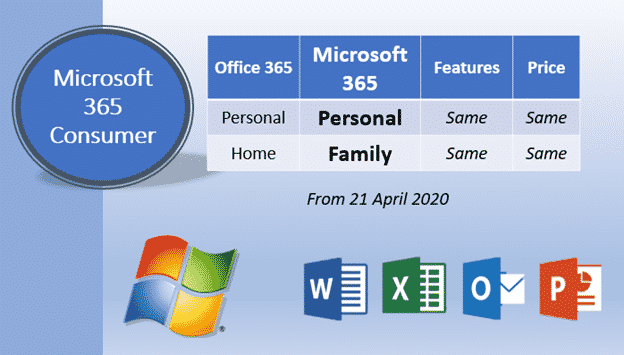
A lot of misleading talk about the Microsoft 365 change makes it seem a lot bigger and more of an upheaval than it really is. Time for a reality break … breath regular everyone. Headlines like these are all ‘bollocks’ as the British say, nonsense: Office 365 major shakeup Replacing
Zoom has some clever tricks available to make a meeting more efficient and fun. Virtual Backgrounds, sharing screens, files, chatting on the sidelines, raising your (virtual) hand and changing the boss of the meeting (aka Host). Also an important tip for PowerPoint in a Zoom meeting. Here’s some Zoom tricks