
Arrived! The first Office bug fixes for 2021
Microsoft announced 83 security bug fixes for January 2021, the count is really 96 once you add the Edge browser patches from last week. At first look, it seems there’s only five Office related patches including two each for Word and Excel. It’s important to keep both Office and the underlying operating system patched. The […]

Using Benford’s Law magic with Excel
Benford’s Law is an amazing tool that is simple to use in Excel. Benford’s Law is one of those mathematical laws that seems to defy common sense but works for most naturally occurring number sets. It says that in most groups of naturally occurring numbers, the leading digit 1 will occur more than 2 as […]

Excel’s CONVERT function for metric and more
How to convert metric to imperial and other measure conversions in Excel. Converting measurements from one system to another can be done by Excel using the CONVERT function … here’s how it works and then we’ll tell you what CONVERT can’t do or should do better. As usual, we decided to write about an Office […]

Nice variations for Stop shape in Word, Excel & PowerPoint
There’s plenty of scope for variations on the basic Not Allowed symbol (red circle with diagonal) using the tools in Microsoft Office. See Make a ‘Stop’ circle / diagonal symbol in Word, Excel & PowerPoint for how to insert the basic ‘Not Allowed’ shape and change to suit your needs. Line Direction The line across […]

Pantone 2021 colors in your Word, Excel and PowerPoint
Pantone has announced not one but TWO ‘colors of the year’ for 2021 and, as usual, we’ll explain how to use those exact colors in Word, Excel, PowerPoint and Outlook. The colors of 2021 are … Illuminating and Ultimate Grey As usual what’s more amazing than the color is the description that goes with the choice. […]
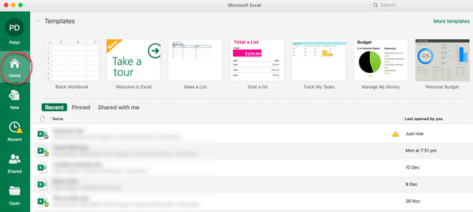
New look in Microsoft 365 for Mac coming in early 2021
Microsoft 365 for Mac is getting a revamped look for the Home or Start menu in early 2021. Here’s all the new and old features in the Home pane or as Microsoft calls it “Office Start experience” (no kidding) The Home panel changes to be more consistent with what’s visible in Microsoft 365 for Windows […]

Microsoft Forms are now for everyone
Microsoft Forms is now available for everyone, not just businesses. It’s available to collect information or opinions for any reason. One example is party planning, virtual party at the moment. Ask people for their preferred date, number of people, diet requests etc. All the info is collected and comes to you in a list or […]

Here’s how Gmail can now edit Office docs directly
Google’s Gmail can now directly edit Microsoft Office documents arriving in email attachments. It’s available to all Gmail users, free and paid accounts. It removes a lot of the hassles of exchanging Office documents with Gmail and Google Docs/Sheets/Slides users. No more document conversion hassles … at long last! Email Attachments edited directly Any incoming […]
Office 2010 patches! A nice December 2020 surprise from Microsoft
The usual security fixes for Microsoft Office this month include some unexpected patches for Office 2010 which is a pleasant surprise. Office 2010 is now officially out of support (since 13 October 2020) but still works fine. That’s supposed to mean there’s no more patches. Microsoft hasn’t explained their reason for these unexpected fixes but […]
Special offer for Microsoft 365 Business Premium or an even cheaper option
If you’re thinking about getting Microsoft 365 email hosting with full Teams and SharePoint, Microsoft has a limited time offer this week only. However, before you jump into their deal, there’s another very similar option that’s even cheaper. Until 30 November 2020, Microsoft is offering 25% discount on their Business Premium service for small businesses. […]

The latest Office ‘Insiders’ names changes
Microsoft can’t help themselves when it comes to naming their ‘Insiders’, ‘Preview’ or beta test versions. The names change for no good reason and timing is different for each platform rather than all Office apps changing at the same time. The latest changes are for MacOS, iOS (iPhone/iPad) and Android devices. They’ve happened months after […]
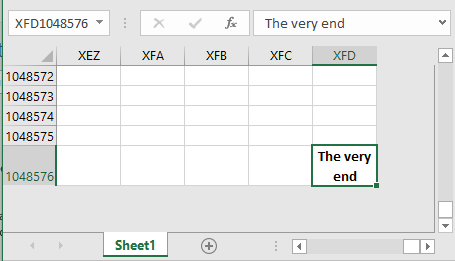
The slow way to the end of Excel
Some people have way too much time on their hands …. and this was pre-lockdown! Hunter Hobbs decided to find out how long it takes to scroll down to the very bottom row of Excel. That’s row 1,048,576. It only takes a moment and two keystrokes to get there, but Hunter decided to take ‘the […]

Office 2010 updates are still available, here’s how
0Patch is stepping in where Microsoft has left by offering continued security updates for Office 2010 after official support was dropped a few months ago. Newly discovered high risk security bugs in Office 2010 will get micropatches from 0Patch. These unofficial updates change the existing program files to prevent the new security lapses troubling your […]

Putting a Command on the Quick Access Toolbar
The Quick Access Toolbar (QAT) is located on the left side of the Word, Excel, PowerPoint or Outlook title bar. You can add commands, options and even symbols for easy and quick obvious access By default, the QAT only has Save, Undo, Redo and Touch/Mouse commands but you can cut down on unnecessary keystrokes by placing […]
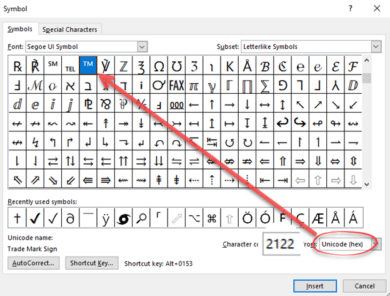
Quickly add any special characters in Office
One of the eternal questions to Office Watch is about adding characters to an Office document. Symbols and characters not on the keyboard. The most common requests are for adding currency symbols like Pound £ Euro € or Yen/Renminbi ¥ but can also include the @ symbol which can, even these days, be missing from […]
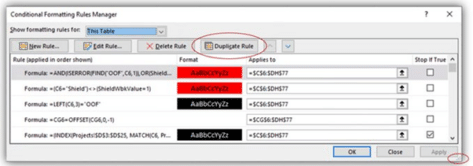
Excel is getting better Conditional Formatting with much needed improvements
Excel’s Conditional Formatting is getting two small but much needed changes that will make it a lot easier to use. According to Microsoft, the latest Insiders releases of Excel 365 for Windows has two changes to the Conditional Formatting Manager dialog. Resizable The dialog is now resizable from the handle at bottom right. That means […]









