
What happened to Flash Fill in Excel?
Back in Excel 2013, Flash Fill was added, a nifty way to join or separate a string from other cells by example. If its seems to have disappeared from Excel 2016 for Windows, here’s how to get it back. In Excel 2013, Flash Fill worked automatically. Just typing the first example in a neighboring cell […]
Rank.AVG() and how it’s different from Rank() and Rank.EQ() in Excel
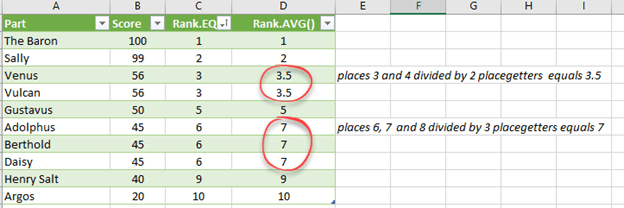
We’ve talked, at length about Excel’s Rank()/Rank.EQ functions and coping with joint or equal rankings. What about Rank.AVG()? Rank.AVG() works differently for equal rankings because it returns an average of the combined rankings. For example, joint 3rd place getters will return the value ‘3.5’ by Rank.AVG() which is the average of ranks 3 and 4 […]

Two ways to show equal rankings with Excel’s Rank() or Rank.EQ()
Rank() and Rank.EQ() are fine while each value/score is different but in the real world you’ll see cells with the same value and ranking. We’ll show you how to detect equal rankings, display a note when there are equal rankings. Let’s start with an example of equal rankings. See Venus/Vulcan in this example, both have […]
January 2018 Office updates roundup
So many patches for Microsoft Office and Windows in this month’s package of bug fixes. Few parts of Windows or Office aren’t patched this month, either directly or indirectly. According to Microsoft there’s ‘only’ 56 patched security holes in their products, this month alone. In reality there’s a lot more patching going on, just how […]
What are Excel Tables and why you should use them
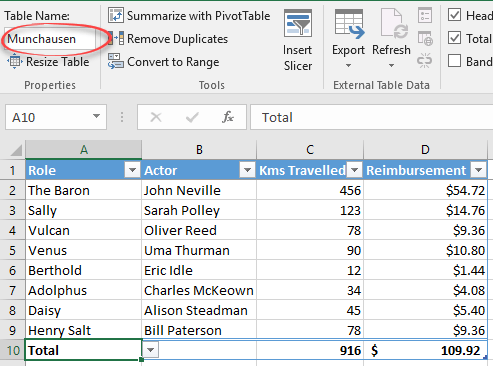
Back in Excel 2007, Tables were added. That simple name hides a quite different and powerful Excel option that, in our view, Microsoft hasn’t explained very well. Excel is often used for lists and Excel Tables make managing and extending those lists a lot easier. In fact, ‘Excel Lists’ was the name of the Tables […]

Excel Slicers beyond PivotTables into Tables
Slicers are a better and easier way to filter lists and it’s available in Excel Tables as well as PivotTables. From Office 2013 Slicers appeared in the Tables tab, before that Slicers were only for PivotTables. Which is great because it makes filtering an Excel table a lot more obvious. Making a Table Slicer is […]

How to run Office 2016 for Windows on a Mac
Crossover, the Windows emulation for Mac computers, has released v17 which adds support for Office 2016 for Windows. With Crossover v17, the default compatibility has changed from Windows XP to Windows 7. That’s a big improvement and opens the way for a lot more recent programs to run like Quicken 2017. There are also some […]

Paul Manafort was trapped by Microsoft Word and how he could have prevented it
The FBI is using evidence from Microsoft Word to oppose a change of release conditions for former Trump campaign chairman, Paul Manafort. We’ll show you the mistakes that were made and how to avoid them. We’re not interested in the prosecution itself nor the politics, here’s a summary. Our focus is on the little known […]
Using Slicer and Timeline together
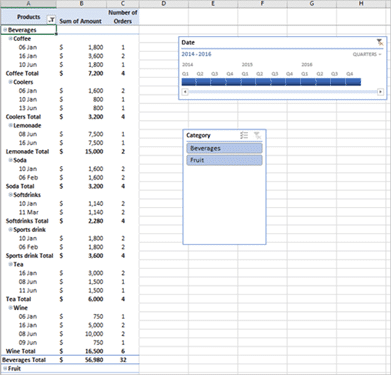
PivotTable Slicers and Timelines can be combined to filter by time and other criteria in Excel. Let’s first add a slicer to filter the data by following the below steps: Click inside the PivotTable and go to the Analyze tab Click Insert Slicer under the filter group. From the Insert slicer dialog box, choose the […]
Timelines for date filtering Excel PivotTables
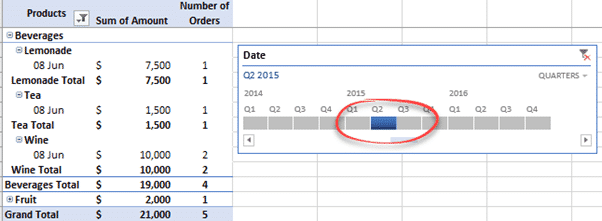
Timelines are a special form of Excel Slicer for PivotTables, to make filtering dates easier. Timelines are slicers that allows you to filter date fields and only date fields in PivotTables. The feature shows you a series of events grouped by time. Here’s a Timeline filtering a PivotTable to show only results from a single […]

Click here to see Aussie accounting magic in Excel
The Australian tax authorities have released some interesting data about the biggest corporate (non) taxpayers in an Excel format. It’s raw data ready for extra calculations, charts and PivotTables. Another example of how publicly available data can be used by anyone to dig into previously obscure areas using Excel tools. The “Corporate Tax Transparency” report […]

Office now available on Chromebooks
Microsoft has released Office apps that work on Chromebooks, the low cost laptops using Google’s Word, Excel, PowerPoint and OneNote apps are now available for most, if not all, Chrome OS users. There seems to be some teething troubles with the Office apps and the Google Play store. Redmond hasn’t exactly shouted about this extension […]

Tamil language comes to Microsoft Office
Tamil language has been added to Microsoft’s suite of translation apps and services. There’s about 70 million Tamil speakers mostly across Sri Lanka, India, Singapore and Malaysia. We checked with Office 2016 for Windows, Office 365 and sure enough there was Tamil among the many language choices. Beyond Office The language is also on “Bing […]
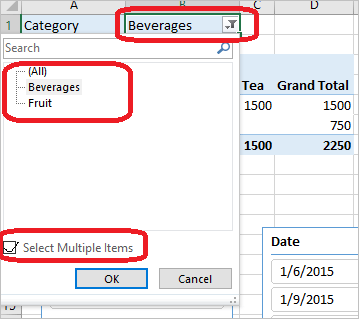
Multiple Selections in Slicers for Excel PivotTables
Rarely do you choose a single Slicer button. More likely you’ll want to select multiple filters or buttons, here’s the various ways to do that. You can press the filter icon next to Beverages and then select multiple items if you want to see both. Just like other parts of Windows, hold down the Ctrl […]

Excel Slicers for PivotTables
From Excel 2010, Microsoft added Slicers to Excel’s PivotTables. From the hype, Slicers sound like some complex Excel feature but they’re really a more useable, friendly and showy way to do something already in Excel – Filtering. For me it’s more of a visual filter and a collaborative tool that can help you figure out […]

PivotTable Filters in Excel
Simple PivotTable filters let you limit the table display to a part of the available data. They have a place in PivotTables, especially for semi-permanent filters that you want to apply broadly. Instead of filtering the original data feed or list, the PivotTable can use a large list which is narrowed down to what you […]









