All about Microsoft Office Word, Excel, PowerPoint and Outlook, Microsoft 365, Office 2021 and earlier versions.
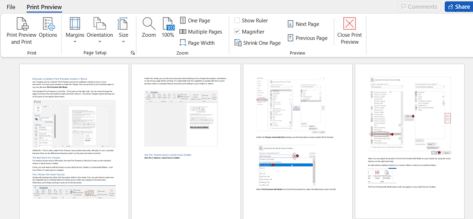
Discover a better Print Preview mode in Word
Let’s imagine you’re in Word’s Print Preview and you’ve suddenly noticed an error in your document. You close print preview to make the change, then you go back to print preview again or you can discover Print Preview Edit Mode. Print Preview in Word has all sorts of goodies for making the final adjustments to […]

How to use XMatch() in Excel
XMatch() function in Excel locates an item in an array or range of cells, then returns its position relative to the item. It’s similar to XLookup() which returns the cell value while XMatch returns a relative position in the array. Syntax =XMATCH(lookup_value, lookup_array, [match_mode], [search_mode]) Arguments Lookup_value – the value to find. Lookup_array – the range/table to search […]

How to do your own modelling in Excel with Forecast
Excel can use past data to project possible future results with the Forecast feature. It’s a very simple version of statistical ‘modelling’. The Forecast function will let you predict future values and data trends, such as consumer trends, future sales and or inventory needs, based on seasonality. Here’s a simple guide on how to use the Forecast feature. Although the data below looks fairly complicated, […]

The best way to add drop-down list in Excel
Previously we talked about How to add a Drop-down List in Word, but you can also work more efficiently in Excel worksheets by making use of drop-down or pull-down lists. We will show you how to use Microsoft Excel’s data validation function to create useful lists within your spreadsheets. How to avoid the trap that lies waiting for the unwary who follow Microsoft’s ‘simple’ instructions. […]

New Features in PowerPoint 2021
In addition to the general Office 2021/LTSC features there are some useful additions to PowerPoint 2021/LTSC including recording presenter videos and changing the reading order for accessibility. See all about Office 2021 for Windows & Mac plus The good and bad in Office LTSC Here’s what’s new/changed in PowerPoint 2021 in addition to the overall […]

Understanding the new Lambda helper functions
As if Lambda() was already a great addition to Excel 365, Microsoft is adding what they call ‘helper’ functions to add even more abilities. Here’s a very short overview of each helper function with links to more information. In some cases, the helper functions are a new and better way to do things already possible in Excel. Some others add […]

New Lambda options and helper functions for Excel
Excel 365’s nifty LAMBDA feature is getting an interesting, literally optional, improvement plus ‘Helper’ functions to extend its usefulness. LAMBDA, a powerful tool that allows users to create their own Excel 365 custom functions without VBA. The feature allows longer formulas to be written once then referenced in a worksheet to a shorter name of the user’s choosing. LAMBDA isn’t just another Excel function, it’s an important change in how Excel works. With Lambda() Excel understand functions as […]
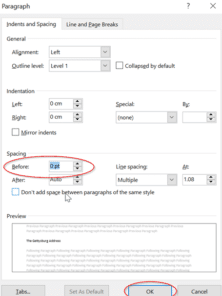
How to Force a Page Break through Styles Setting in Word
There’s another way you can force a page break before a paragraph in Microsoft Word. By setting this up, the page breaks can automatically appear without you having to worry. This is particularly useful if you have long documents with several different headings. Just simply modify the style to include the page break before. Learn […]

Office LTSC is out now with Office 2021 coming in a few weeks
Microsoft has publicly released Office LTSC or Long Term Servicing Channel. It’s the ‘fixed feature’ Office suite for volume licence customers. It’s a replacement for Office 2019 but only available to business and government customers. Office 2021 is the personal and small business equivalent which will be out on 5 October, the same day as […]

Easy adding check boxes to a Word document
Interactive checkboxes can easily be added to your Word document for a variety of uses. Perhaps you need to create a to-do checklist to help monitor the completion of tasks on top of a collaboration document, or make it simpler for users to read and complete surveys or forms. Either way, we will provide you with a simple and easy […]
Get the patch now for the latest Office security hole
Microsoft has released a patch for the MSHTML security bug that’s being used with Office documents to infect computers. The bug is in MSHTML, the browser rendering engine used by Microsoft Office. If someone is tricked into opening a hacked Office document with ActiveX control, they could infect their computer with some virus, ransomware or […]

How to use Excel to get API data from any source
There are many API’s available on the Internet that can provide great and timely data in ways that Excel can understand, here’s how you can do it. We’ve recently received emails asking how to use Excel to import data from specific API’s. Always we have the same answers because most API’s work in similar ways […]

There are two official document standards – why?
Here’s what you need to know about the two official international document formats, Microsoft’s OpenXML (.docx .xlsx etc) and Open Document Format (.odt .ods etc) both supported in Microsoft Office and most other office suite software. Each format has been recognized by international bodies so there are two ‘official’ document standards for Planet Earth. Both […]

Make a new Office file within Microsoft Teams
Not only can Teams share Word, Excel or PowerPoint files, but you can also make new documents right in Teams or upload existing documents. Create a New File You can easily create a new file within Teams for Word, Excel, PowerPoint or OneNote from the New pull-down list at left. Or make a new folder. […]

How to Filter Data in a PivotTable
Excel’s PivotTable allows you to evaluate trends, comparisons, and patterns within datasets. Once a PivotTable is setup, you can filter “Drill down” into it to focus on key information. These days there are several ways to filter a PivotTable, Slicers (which Microsoft loves to boast about), AutoFilter and by Field List. All these options mean […]

Bumper month for new features in Office 365
The September 2021 release preview has a lot more than usual new and updated features in Office 365 for Windows. Almost as if Microsoft has been saving them up for a bumper surprise! It’s all in the ‘Current Channel (Preview)’ release v2109 build 14430.20088 that’s out now. This is the last stage before the updates […]