
Eiffel Tower 🗼 emoji in Word, Excel, PowerPoint and Outlook
Insert the Tower 🗼 (Eiffel Tower, Tokyo Tower) emoji, symbol or stock photo into Microsoft Word, Excel, PowerPoint or Outlook. Both in Office for Windows and Office for Mac. The emoji is commonly called ‘Eiffel Tower’ in the west but it was originally intended to show the Tokyo Tower. That’s why some emoji are colored […]
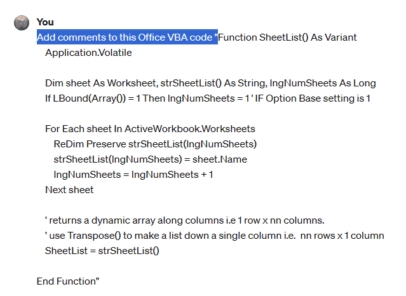
Add comments/help to your Office VBA code
ChatGPT is a powerful tool that can enhance your Office VBA code with comments and help. It or Copilot can analyze your code and generate explanations, tips, and examples to make it easier to read and debug One of the modern AI tricks is to help write and understand programming code. We’ve already looked at […]
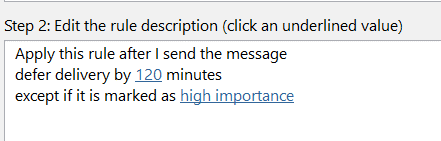
Delay sending a message the easy way in Outlook
Do you ever wish you could take back an email that you sent too soon or with a mistake? You’re in luck because Outlook lets you delay sending messages for a certain amount of time after you hit Send. It’s like having a second chance to prevent a mistake. We’ll show how it’s done with […]

What is Pin in Outlook and who gets it?
Microsoft has been boasting about a ‘Pin’ feature in ‘Outlook’ to highlight important messages that you don’t want to forget when it disappears down a long list of emails. This is how Pin works and which Outlooks have it. Pin moves the message to the top of the Inbox (Focused or Other if you have […]
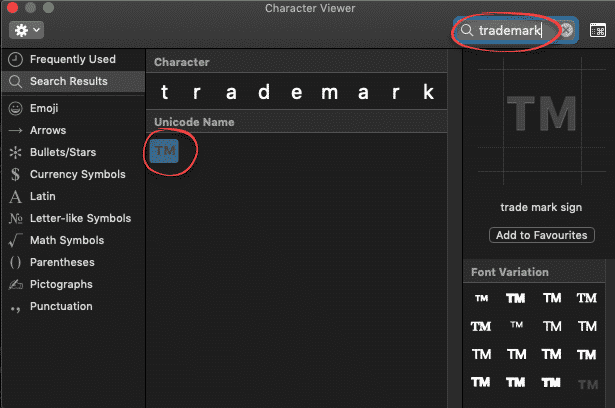
Trademark ™ symbol in Word, Excel, PowerPoint and Outlook
Type the Trademark ™ TM symbol as text and icon into Microsoft Word Excel PowerPoint or Outlook. Both in Office for Windows and Office for Mac. Trademark ™ TM symbol is, strictly speaking, called the Unregistered Trademark symbol. Its counterpart is the Registered Trademark ® Trademark in Word and Outlook The Trademark ™ sign has an […]
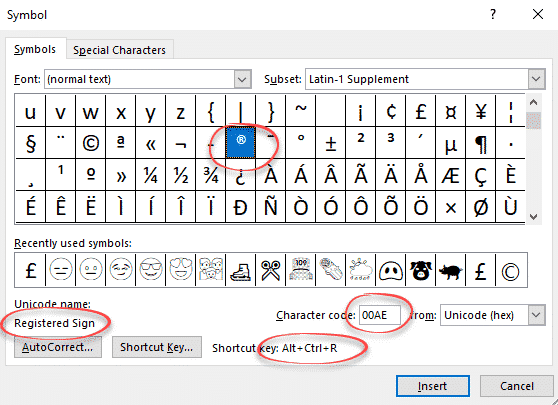
Registered Trade Mark ® symbol in Word and Office
How to insert the Registered Trade Mark ® symbol as text or icon into Microsoft Word, Excel, PowerPoint or Outlook. Both in Office for Windows and Office for Mac. Registered Trade Mark ® not to be confused with the Unregistered Trade Mark ™ symbol. Registered Trade Mark ® in Word and Outlook The Registered Trade Mark […]

Microsoft Office photo editing with Apollo 8’s Earthrise
As a quick example of what’s possible, here’s a quick look at some photo editing options in Microsoft Office, Word, Excel, PowerPoint or Outlook emails. Since it’s Christmas, we’ll use one of the famous Apollo 8 Earthrise images. We’ve already talked about how Apollo 8’s Earthrise, as we know it, is a cropped, rotated and […]
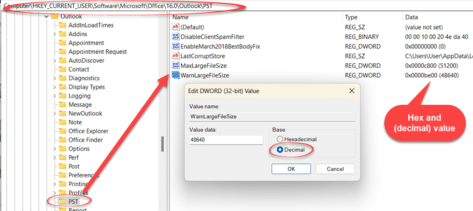
Fixing and increasing Outlook PST/OST size limits
Outlook for Windows data files (PST or OST) start with a maximum size of 50GB but they can be much, much larger if necessary. Here’s how to do it as we make sense of Microsoft’s out-of-date advice. Outlook for Windows use PST and OST files to save email, calendar, contacts and a lot more. These […]

Connect two Office Shapes with lines or arrows
Microsoft Office can make drawings with linked lines or arrows between shapes that automatically change if the shapes are moved. Here’s how Office connectors work and the tricks to make connecting shapes work better. A little known but really useful part of the Insert | Shapes is the ability to link objects with lines that […]

Typing Türkiye in Word, Outlook, Windows or Mac
Türkiye is now the preferred name for the country Turkey. Here’s how to easily type Türkiye with the umlaut in Microsoft Office, Word and Outlook on Windows or Mac. It’s also a good example of the limits or traps in Word’s Autocorrect. A common trick for a change of name is AutoCorrect, e.g. anytime you […]

Ten tips for better Outlook emails
The Washington Post has a ten-tip etiquette guide to which we’ve added our Microsoft Office & Outlook specific suggestions. Check out Danielle Abril’s article at The Washington Post. Her recommendations are necessarily general so we’ll add more technical and specific comments for Office users. Consider not sending an email So many other options available beyond […]
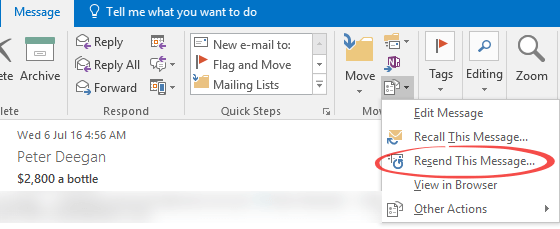
Resend email – Peter’s favorite (hidden) Outlook feature
There’s a really useful Outlook (Windows and Mac) feature that Peter (our Grand Poo-bah or Editor in Chief) uses regularly even though it’s hidden away in Outlook menu: Resend. ‘Resend this message’ opens a new copy of a sent message with all the same details filled in (To, CC, Bcc, Subject, Body and Attachments). It’s […]

How to quickly switch between Word and Office windows
Often you need to switch between windows of the same program, so there should be a quick keyboard shortcut to do that. Here are your options in Windows or Mac. Whether you’re moving between Word documents, Excel workbooks or PowerPoint decks or Outlook emails, the need is the same. You want to quickly move between […]

Satellite 🛰 emoji in Word, Excel, PowerPoint and Outlook
Insert the Satellite 🛰 emoji or icon into Microsoft Word, Excel, PowerPoint or Outlook. Both in Office for Windows and Office for Mac. How Satellite 🛰 looks in different fonts. In Windows fonts only Segoe UI Emoji and Segoe UI Symbol have the Satellite emoji. As usual the Apple version (Apple Color Emoji font) looks […]

Office 2019 & 2016 lose an important part of their support
Microsoft has stopped supporting connections from Office 2019 and Office 2016 to their Microsoft 365 online services. It’s another ‘passive aggressive’ move to get customers off older versions of Office and onto Microsoft 365. Both Office 2019 and Office 2016 will continue to be supported with bug and security fixes until late 2025 however Microsoft […]
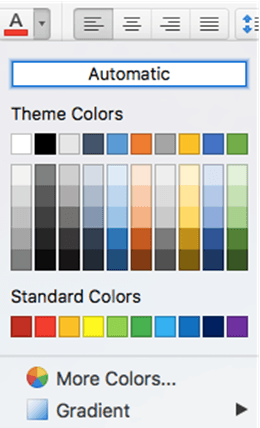
Color selection in Office for Mac, complete
Office for Mac has quite different and extensible color selection options for text, shapes, pages etc. that are the envy of Office for Windows. We’ll explain them all, eyedropper, swatch, color wheel or sliders, palettes and even pencils. Choose from the same range of colors as Windows, but in many different ways and more. All […]









