
WTF! Microsoft 365 goes offline … again. This has got to stop.
There’s been another breakdown in Microsoft’s crucial online services – the third in only ten days. The trouble started on Thursday 7th October about 2:45pm US East Coast time (18:45 UTC). Users could not login to Microsoft cloud services. According to Microsoft, the outage affected “Microsoft Teams, Outlook, SharePoint Online, OneDrive for Business, and Outlook.com.” […]
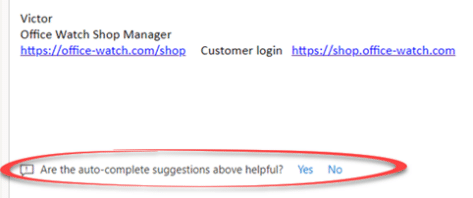
Text predictions will type for you in Outlook and Word
Word and Outlook are getting a new text prediction feature which suggests the rest of a sentence and phrase as you type. It’s like an advanced form of autocomplete that appears in browsers. As you type, the rest of a word or more will appear in light gray. Accept the text prediction, press Tab. Reject […]

‘Outlook’ has another breakdown – the second this week
Microsoft isn’t having a good week with yet another breakdown of their cloud services. This time it’s their mail hosting infrastructure for Microsoft 365 hosted mailboxes and Outlook.com . The troubles started early on Thursday 1st October 2020 (before 7am UTC ) Initially it seemed to only affect Outlook on the Web (formerly Outlook Web […]

When and how to switch from Office 2010 – your questions answered
Office 2010 ends support on 13 October 2020 and we’ve been receiving questions from readers asking about switching to newer Microsoft Office. We’ll answer questions about when to update, what to replace Office 2010 and important factors to consider. We’re hearing concerns about privacy in modern Office, reliability and the constant, monthly, changes in the […]
Microsoft 365 offline! What happened and what you should do
Microsoft 365 suffered a major outage of their online and cloud services. Here’s what we know, where we stand now and how to reduce your risk of trouble with future problems. The online services from Microsoft could not be accessed from about 5pm Monday (US Eastern) that included Office logins, Outlook/Hotmail, Teams and more. It […]

iOS 14 changes give you improvements in Outlook and OneDrive
Apple’s iOS 14 for iPhone and iPad have some useful new features. Change default mail and web apps, Widgets, Scribble and Translate. Microsoft wasted no time improving Outlook to take advantage and adding a little extra to OneDrive. iOS 14 was released with very little notice to app developers. Most were ready for the change […]

Fill in a PDF form with your signature
There are several ways to fill in a PDF form and add your signature with Microsoft Word, Acrobat Reader or online services. All these tips are free with nothing to pay. It’s possible to ‘sign’ a PDF form and return it without making a paper copy. Paper forms are so 2019 <g>. There’s no need […]

Customer login now required to use Microsoft 365 apps
There’s a change in the way Microsoft 365 works with a sign-in to a Microsoft account. This applies to Word 365, Excel 365, PowerPoint 365 and other Office apps. Up to recently, Microsoft 365 / Office 365 has worked normally either when signed into a Microsoft account or not. Having a Microsoft account wasn’t required […]
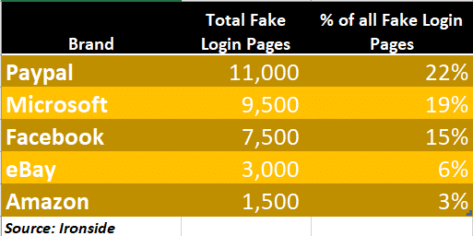
Beware popular but fake Microsoft and Microsoft 365 login pages
Fake login pages for Microsoft 365, OneDrive or Outlook.com are now the second most common phishing targets. Links in emails or messages to these bogus pages which grab your email and password for hackers to steal your secrets, or those of your company. Ironside reports that Microsoft related fake login pages are only second to […]
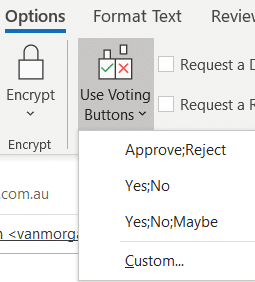
Easy Voting by email in Outlook
Microsoft is releasing a ‘Quick Poll’ option in Outlook ignoring the very similar, voting buttons, option that’s already in Outlook for Windows and Outlook for Mac. Use Voting Buttons to ask a question and Outlook will automatically collect responses. Office Watch also explains how recipient see the voting options and respond. Voting buttons have been […]
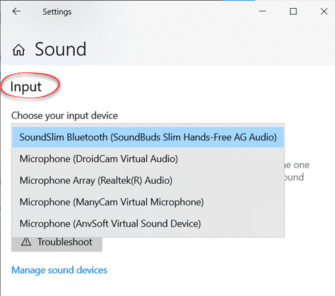
Microphone setup and settings for Dictate and Windows 10
Setting up and testing a microphone to work with Windows 10 is necessary before using Dictate in Office. Go to Windows settings to control which microphone is used by Word 365’s Dictate. Dictate has no microphone settings of its own (in Word for Windows or Word Online). Both use the Windows default recording device. That’s […]
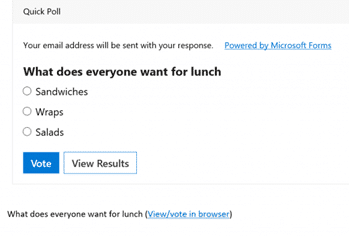
Easy and Quick Polls in Outlook
Outlook for Windows is getting a different way to ask questions of people via email – a quick poll. Quick Polls use Microsoft Forms, the online quiz or polling system. Start in any new message, Insert | Include | Poll. It’s more likely you’ll just see a small bar graph icon in a compress ribbon. […]

Everyone can make an Outlook Quick Poll now
Everyone with Microsoft 365 can get a ‘quick poll’ now with any email account or software. No need to wait for the Outlook Quick Poll option, now in preview for Microsoft 365 customers with Outlook for Windows. As we’ve already explained, Quick Poll is a simple and very limited way to add a Microsoft Forms […]

Left Right arrow ↔ in Outlook, Excel, PowerPoint and Word
Type the Left Right arrow ↔ into Microsoft Word, Excel, PowerPoint or Outlook. Both in Office for Windows and Office for Mac. How Left Right arrow ↔ looks in different fonts. Here’s some examples of how Left Right arrow ↔ looks in common Office fonts. Left Right arrow ↔ codes These are the important code […]

Turn talk into text in Word 365 for Windows
Modern Word has a powerful ‘Speech to Text’ option ‘Dictate’ which works a lot better than similar options in the past. If you’d tried and been disappointed with dictating into Word, it’s time to give it another try. Dictate is only available to Microsoft 365 subscribers with Office 365 software for Windows, Mac, iPhone, iPad […]

Blood Type and Star Signs now in Outlook for Mac
One of the most curious feature additions is now in Outlook for Mac. Each Contact can have their Blood Type and Star Sign included along with phone numbers, address etc. These details and many more have always been possible in Outlook Contacts via custom fields. In the latest Outlook for Mac preview the list of […]









