Office 2021 is the personal and small business ‘perpetual licence’, non-subscription version of Microsoft Office. For Windows and Mac.
Office LTSC (Long Term Servicing Channel) is the volume licence ‘perpetual licence’, non-subscription version of Microsoft Office for organizations, companies and governments. Also for Windows and Mac.
The features in Office 2021 and Office LTSC are very similar, if not the same.

Excel Paste Special with math operations
Excel’s Paste Special feature can be used to modify multiple numbers at once. Paste Special is more commonly used to paste only values or formatting, it has other tricks to offer. We’ll show you firstly how to multiply numbers in Excel by using Paste Special then add, subtract and division. Addition and Multiplication are easy […]

Changing Word’s Text Box Gallery to suit you
The Word Text Box Gallery gives you a head start on nice document effects. Under the Insert tab in Word is the Text Box gallery, a selection of pre-set options to jazz up your document. It’s the easy way to put in fancy design elements you see in books and magazines like side-bars or ‘pull […]

Inside OneNote Pages, what to add and search
OneNote Pages can contain all manner of things; text, files, documents, PDF, drawing, images, tables, web clippings, lists, audio and video files. Pictures and recordings in OneNote have some nifty tricks and you can search everything you’ve added to OneNote. Text is very simple just ‘click on the page and type’. A container is automatically […]

Word Style inheritance made clear and simple
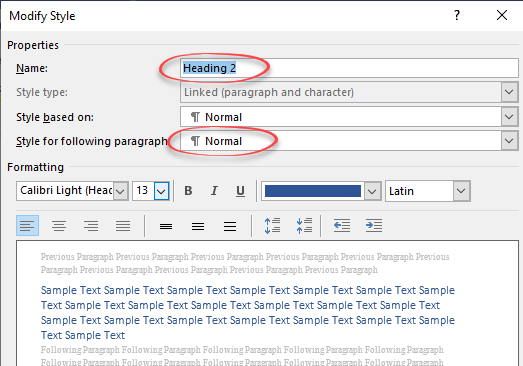
Styles in Microsoft Word would be very cumbersome if you had to set up each one individually. To make it easier, styles have inheritance. A new style is usually a copy, linked to an existing style with just some changes to selected items. Here’s an example of inheritance in a simple Word document. This is […]
Why choose Body Text vs Normal style in Word
There are good reasons to avoid the Normal style for the main text in a Word document and use the hidden ‘Body Text’ style instead. The standard Microsoft Word document structure has Headings (Heading 1, Heading 2) … with paragraphs of text in the Normal style. It sounds good but, as usual with Microsoft Office, […]

Make thumbnails for Office documents with extra tricks
Adding thumbnail or preview image for Word, Excel or PowerPoint Office documents is easy, though you won’t find the choice anywhere obvious. We’ll dig into how thumbnails work for some nerdy extra detail. Thumbnails are the small images that appear in File Explorer and elsewhere instead of the standard icons for Word, Excel, PowerPoint etc. […]

Ordinal Numbers in Excel, 1st, 2nd, 3rd etc.
You can show ordinal numbers in Excel; 1st, 2nd, 3rd. Sadly, it’s not as simple as you’d think. The ‘Ordinal Rank’ column, 1st, 2nd etc you’d expect to be provided by Microsoft, but it’s not. There’s no in-built function nor a number format. After all, Excel has many different number formats already, so ordinal numbers […]

How to avoid the Gill Sans font controversy in Windows and Office
The work of Eric Gill is controversial these days, for good reason. Microsoft Windows and Office have fonts based on Gill’s work so users might need to think twice about using Gill Sans and similar fonts. Gill Sans MT and Gill Sans Nova are supplied with Windows and Office but are becoming stigmatized. Those fonts […]
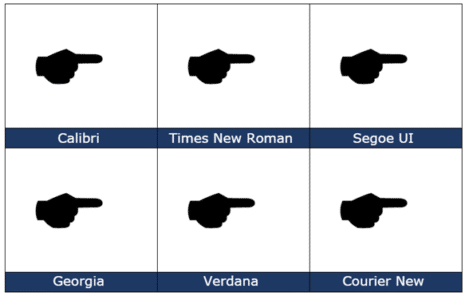
Black Right Pointing Backhand Index 🖝 symbol in Office
insert the Black Right Pointing Backhand Index 🖝 into Microsoft Word, Excel, PowerPoint or Outlook. Both in Office for Windows and Office for Mac. Black Right Pointing Backhand Index 🖝 symbol can be used as a creative bullet symbol in lists or to point a direction on a sign. It’s the lesser known complement to […]

Playing one song after another in PowerPoint
To play a selection of different audio tracks, one after another is surprisingly clumsy even in Microsoft 365 PowerPoint. For example, you might like to have multiple tracks from a single album or several movements from a symphony. We expected that a simple Animation would work with the second music track set to play ‘after previous’ […]

Add music for the whole PowerPoint presentation
A common request is for music to play throughout a PowerPoint presentation. Handy for automatic and kiosk slideshows. That’s easy in PowerPoint these days. Insert the audio then look on the Playback tab. There’s a choice ‘Play in Background’ that does the job in one click. ‘Play in Background’ is just a way of turning on three existing settings: Play across […]

Almost Equal ≈ symbol in Word, Excel, PowerPoint and Outlook
Almost Equal sign ≈ can be typed into Microsoft Word, Excel, PowerPoint or Outlook. Both in Office for Windows and Office for Mac. The Almost Equal symbol ≈ is commonly used within Mathematics to indicate two values are roughly equal, but not exactly equal. Or use it whenever you need horizontal wavy lines! How Almost […]
Moving a row or column in Excel
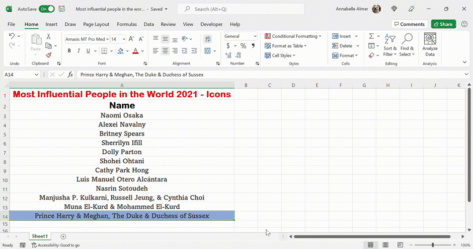
How to move rows or columns up, down or across an Excel worksheet. There’s a quick way but it’s not obvious. Excel has a variety of different ways in doing this, but it’s important to know the fastest and easiest way, to save you a lot of time and hassle. In Word, moving paragraphs or […]
Easy 2024 calendars in Microsoft Word
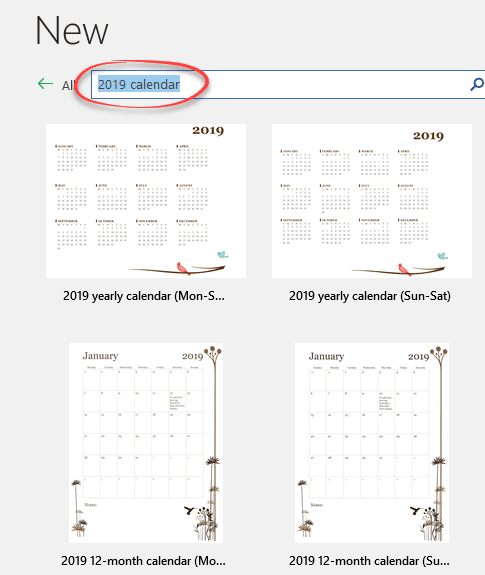
Word has many calendars in the File | New templates supplied by Microsoft. Search for “calendar” in the File | New pane then make simple changes to suit you. In Microsoft Word’s File | New pane, search for ‘calendar’. There are two basic calendar designs: Start of Week Some have macros to change which day […]

Google Font recommended pairing for Word and Office
Here’s how to choose good looking font pairs for your Word headings and body text or PowerPoint titles and text. We’ve shown you how to use Google Fonts in your Office documents. The Google Fonts site itself is little help but others have curated suggested pairings. Most of the suggested Google Font pairs are for […]
Using WOFF fonts in Microsoft Office
WOFF are a new-ish type of font that you might have seen mentions or downloads. Here’s how to use them in Microsoft Office; Word, Excel or PowerPoint. WOFF is Web Open Font Format designed to be compact and easy to download. WOFF is for web sites and mobile apps, not desktop programs like Office. Despite […]