Office 2021 is the personal and small business ‘perpetual licence’, non-subscription version of Microsoft Office. For Windows and Mac.
Office LTSC (Long Term Servicing Channel) is the volume licence ‘perpetual licence’, non-subscription version of Microsoft Office for organizations, companies and governments. Also for Windows and Mac.
The features in Office 2021 and Office LTSC are very similar, if not the same.

Halloween icons and other delights in Microsoft Office
Microsoft has some Halloween related images, icons and more to add a little spooky to your documents and slides. See more Halloween suggestions – images, icons, fonts and more. We had a look through the Office Stock Content (Insert | Icons or Insert | Pictures | Stock Images) for Halloween imagery. It’s available in Microsoft […]

PDF and SVG previews now possible in Outlook
Microsoft PowerToys have fixed a glaring omission from Outlook, Windows and the Edge browser. PowerToys now lets Outlook preview PDF, Markdown and SVG attachments in the Reading Pane. For too long, the main way to get an Outlook preview of a PDF email attachment was to install the whole Adobe Acrobat Reader software. The same […]
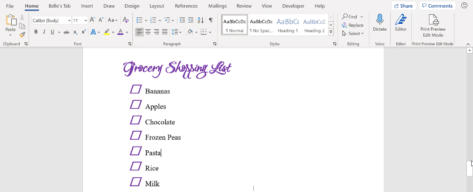
Make your own, better paper checklist in Word
Word has many options to make simple checklists that you can print out and tick with a pen (ink or digital). Plenty of formatting choices for the shape of the tick ‘box’, it’s color and size. There’s a simple shortcut to re-order the list. Previously we’ve discussed how to make an interactive check list in […]
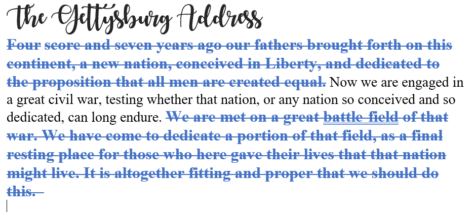
Redo tricks in Word, Excel, PowerPoint and Outlook
Redo is the often-forgotten partner to Undo. It’s mostly used to ‘undo an undo’ or reverse the last ‘Undo’ action but ‘Redo’ has other uses in Word, Excel, PowerPoint and Outlook. In most cases, you use the redo button to revert to a previous state. For example, if you used the undo button within your […]
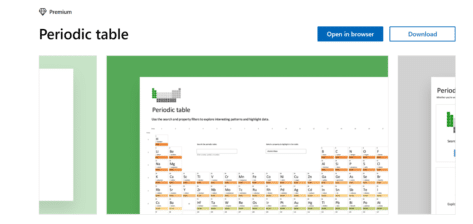
Check out the powerful Periodic Table template for Excel
Excel and Wolfram have teamed up to produce a handy interactive Periodic Table Template, useful for those searching for an introduction to chemistry, or a handy guide for study. The table lets you easily access information on elemental properties, chemical compounds, diagrams and more. You can download or open the template in your browser here. […]

New Features in Access 2021
Here’s the short list of new and changed features in Access 2021. It has only three new and changed features in the high-end Office 2021 and Office LTSC 2021 bundles. Remove, relink, or refresh linked tables The Access database includes a Linked Table Manager that provides a central location for viewing, managing and viewing all […]

Why Word has a problem with an open dialog box
Back in 2010 an Office Watch reader drew our attention to this Microsoft Knowledge Base article 2008277 (update: after we published this article the KB article was totally removed by Microsoft). “Error message “The command cannot be performed because a dialog box is open” when opening a Word file from outside of Word” It’s was curious […]

Using the Source Manager for citations in Word
An essential part of Word’s citations and bibliography feature is the Source Manager dialog – here’s how to, er, manage the Source Manager. Open the Source Manager from References | Citations and Bibliography | Manage Sources. There is a Current List (at right) which is saved in the current document. On the left if the […]

Understanding Citations and Sources in Microsoft Word
The workload of students and academics has been made a lot easier with the arrival of Citation features in Word. They are useful for everyone, not just in academia. Citations are individual references to source material you’ve quoted in your document. A Bibliography is a list of citations and sources used in your document. Word […]

Excel the full history of rows and columns
How many rows and columns does Excel have now and in the last 25 years of Excel for Windows and Mac? All the talk about 64-bit versions of Office has raised the issue of maximum rows and columns in Excel. A few readers seem to believe that 64-bit Excel will have more rows or columns […]
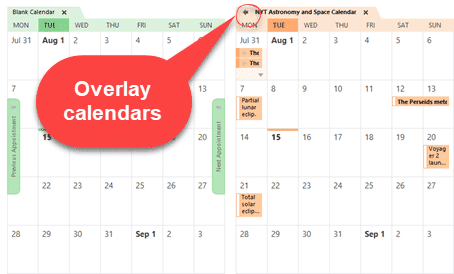
See multiple calendars in Outlook
In Microsoft Outlook you can view two calendars ‘side-by-side’ or overlaid to look like a single calendar. Select two calendars from the left-side pane of a Calendar view. Choose from ‘My Calendars’ or ‘Other Calendars’. The selected calendars appear ‘side-by-side’ in different colors. Overlaid with other calendars Click on the little ‘left arrow’ button on […]

Six choices for removing formatting and more in Excel
Excel has six different choices for removing content, formatting, comments or everything from cells. Five are on the ribbon plus another hidden away. Plus three useful keyboard shortcuts, one obvious and two very obscure. Home | Clear On the right of the Home tab is a selection of five ‘Clear’ options under the little eraser […]

All your Clear Formatting options for Microsoft Word
Microsoft Word has three different keyboard shortcuts to clear formatting, each with its own special variation on how to remove things like bold, italics etc. from text. Choose from Ctrl + Space , Ctrl + Q or Ctrl + Shift + N depending on exactly what you want to remove and what to leave behind. […]

How to clear all formatting in Office documents
Sometimes text formatting can get confusing in Word, PowerPoint, Outlook, Publisher and OneNote. There are several ways to clear the additional formatting and return to original settings. The formatting styles in your text can be easily restored to their default settings by clearing all formatting. Users can waste a lot of time trying to change […]
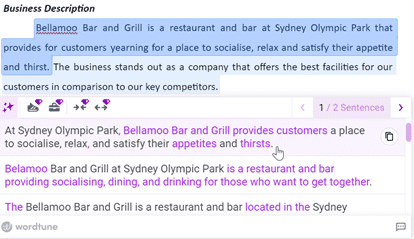
Five ways to make summary or paraphrasing of Word documents
There are many online tools that will summarize or paraphrase a long Word document into something shorter and more readable. These five tools also have other uses. Originally, Word 2007 had an Auto Summarize feature, but it was dropped in Word 2010, so Word users will need to rely on external paraphrasing services. A paraphrase […]
How to open a mystery file with no extension
What can you do with a file attachment that has no file extension? Sometimes you get a file, probably an email attachment, that has no file extension. Without something after the dot/period (.doc .docx .xlsx .pptx etc.) Windows doesn’t know what program to use. This is most likely to happen with files sent from Mac […]









