Office 2021 is the personal and small business ‘perpetual licence’, non-subscription version of Microsoft Office. For Windows and Mac.
Office LTSC (Long Term Servicing Channel) is the volume licence ‘perpetual licence’, non-subscription version of Microsoft Office for organizations, companies and governments. Also for Windows and Mac.
The features in Office 2021 and Office LTSC are very similar, if not the same.

Changing text and icons on Office Quick Access Toolbar
Improve your Word, Excel, Outlook or PowerPoint Quick Access Toolbar (QAT) beyond the small changes allowed by Microsoft directly. This works in all modern Office for Windows including Microsoft 365, Office 2016/2019/2021/LTSC. You’ll be able to shorten the overly long text labels or change icons (because too many are the same) with a short list […]

Office LTSC changes name, just a little
Microsoft has slightly changed the name of the new Office LTSC product, perhaps as a clue to their future intentions for the Long-Term Servicing Channel product line. Office LTSC is a new perpetual licence version of Microsoft Office for volume licence customers only. The consumer / small business equivalent is Office 2021. LTSC stands for […]

New look for Microsoft 365 and Office 2021
From Tuesday 5 October 2021, a new look is be available to Microsoft 365 and Office 2021. Don’t worry, it’s not a major change. Everything on the tabs, ribbon and dialogs remains exactly where they are. Microsoft grandly calls it a ‘visual update’ we call the changes ‘a new coat of paint’. 5 October is […]
Office LTSC 2021 explained, the good and bad
Office LTSC 2021 is the new version of Microsoft Office for organizations and volume customers. Here’s what we know, the good news and bad news. What the !*@&$ is LTSC? Office LTSC means Long Term Servicing Channel. It’s a new name for what Microsoft calls a ‘perpetual licence’ version. A single payment for ongoing use […]
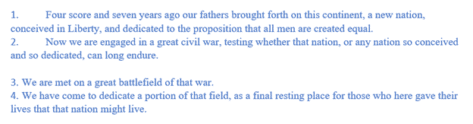
How to Easily Create Numbered or Bullet list in Word without indents
Numbered or bullet lists don’t have to look the way Microsoft sets automatically here’s how to change them to suit your needs and style. In Microsoft Word, it is simple to create a numbered or bullet list. Simply select your text | Home Tab | Paragraph Group| Select the Numbering or Bullets icon. From there […]

Office 2021 prices now revealed plus ‘generous’ extras
Microsoft has confirmed the prices for Office 2021 to consumers and announced some ‘extras’ which aren’t really anything new and, in one case, self-serving for Microsoft. Office 2021 prices Office 2021 is the new perpetual license, single payment or non-subscription version of Microsoft Office. The replacement for Office 2019. It has fixed features compared to […]

New and better features in Office 2021 and Office LTSC
Here’s the new and improved features in Office 2021 and Office LTSC which apply across all the major apps; Word 2021, Excel 2021, PowerPoint 2021 and Outlook 2021. We’ve checked Microsoft’s list of new Office 2021 features against the actual software. See all about Office 2021 for Windows & Mac plus The good and bad in Office LTSC There are stock images, icons […]

Skype surprise improvements are ‘buttery smooth’
Skype is getting a surprise makeover with improved group calling views, display customization, two camera support and even translation on calls to regular phone lines. Microsoft calls these changes, we’re not kidding, ‘buttery smooth’. The announcement is a surprise because all the indications have been that Skype is on its way out, being replaced by […]

Exponential calc choices and trap in Excel
There are two exponential function options in Excel. Like many things in Excel, what looks simple has some traps for the unwary. We’ll explain why the Power() and ^ don’t always give the same or even correct result. Exponentiation is an operation in mathematics, written as an, involving the base a and an exponent n. […]
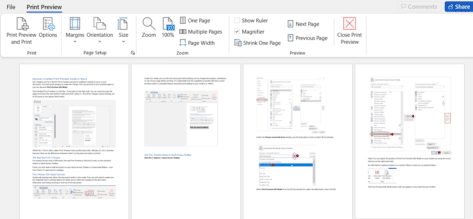
Discover a better Print Preview mode in Word
Let’s imagine you’re in Word’s Print Preview and you’ve suddenly noticed an error in your document. You close print preview to make the change, then you go back to print preview again or you can discover Print Preview Edit Mode. Print Preview in Word has all sorts of goodies for making the final adjustments to […]

How to use XMatch() in Excel
XMatch() function in Excel locates an item in an array or range of cells, then returns its position relative to the item. It’s similar to XLookup() which returns the cell value while XMatch returns a relative position in the array. Syntax =XMATCH(lookup_value, lookup_array, [match_mode], [search_mode]) Arguments Lookup_value – the value to find. Lookup_array – the range/table to search […]

How to do your own modelling in Excel with Forecast
Excel can use past data to project possible future results with the Forecast feature. It’s a very simple version of statistical ‘modelling’. The Forecast function will let you predict future values and data trends, such as consumer trends, future sales and or inventory needs, based on seasonality. Here’s a simple guide on how to use the Forecast feature. Although the data below looks fairly complicated, […]

The best way to add drop-down list in Excel
Previously we talked about How to add a Drop-down List in Word, but you can also work more efficiently in Excel worksheets by making use of drop-down or pull-down lists. We will show you how to use Microsoft Excel’s data validation function to create useful lists within your spreadsheets. How to avoid the trap that lies waiting for the unwary who follow Microsoft’s ‘simple’ instructions. […]
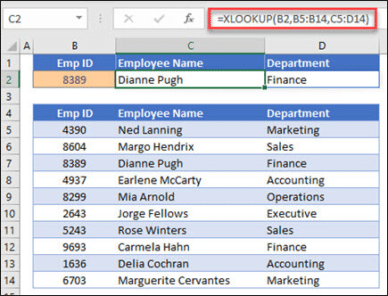
New Features in Excel 2021
In addition to the general Office 2021/LTSC features there are some useful additions to Excel 2021/LTSC including the dynamic array functions, improved XLookup()/XMatch() and Let() but sadly no Lambda(). All these features are in Excel 2021 and Excel LTSC for both Windows and Mac in addition to the overall updates that apply to all the […]
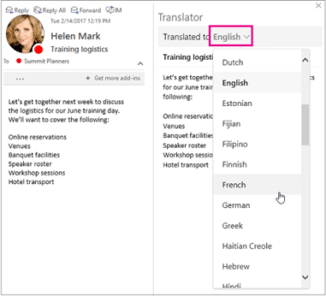
New Features in Outlook 2021
In addition to the general Office 2021/LTSC features there are some useful additions to Outlook 2021/LTSC including a better search box, translation of emails. See all about Office 2021 for Windows & Mac plus The good and bad in Office LTSC Here’s what’s new/changed in Outlook 2021 in addition to the overall updates that apply […]

New Features in PowerPoint 2021
In addition to the general Office 2021/LTSC features there are some useful additions to PowerPoint 2021/LTSC including recording presenter videos and changing the reading order for accessibility. See all about Office 2021 for Windows & Mac plus The good and bad in Office LTSC Here’s what’s new/changed in PowerPoint 2021 in addition to the overall […]









