Office 2021 is the personal and small business ‘perpetual licence’, non-subscription version of Microsoft Office. For Windows and Mac.
Office LTSC (Long Term Servicing Channel) is the volume licence ‘perpetual licence’, non-subscription version of Microsoft Office for organizations, companies and governments. Also for Windows and Mac.
The features in Office 2021 and Office LTSC are very similar, if not the same.

Office 2007-Office 365 – new look – same shortcuts
Office 2007 and later to Office 365 not only has keyboard shortcuts but in many ways they are better than previous versions of Microsoft Office. For the most part the shortcuts used in Office XP and Office 2003 still work in Office 2007 through 365 also – despite the very different look of the screen. […]

Office shortcut of the week – 2004 compendium
We place all of the “Shortcut of the Week” tips from 2004 in the one convenient place. Tip 1 – Undo The Undo function has become especially important over the years as Microsoft puts more ‘intelligence’ into their products. Sometimes it ‘corrects’ your spelling or re-formats something you were quite happy with, thank you very […]

What’s going, going and gone from Windows 11
Any major Windows or Office update focuses on the new and changed stuff. Inevitably, there are also items removed or ‘deprecated’ (meaning they won’t be improved and will eventually be removed). See all the Office-Watch.com coverage of Windows 11 Windows 11 removes or moves quite a few features, some are a little surprising. Internet Explorer […]
PrintNightmare – what it is and what you must do now
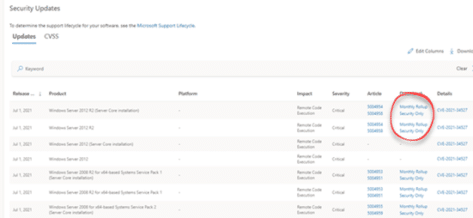
The latest and serious Windows security bug is called ‘PrintNightmare’. We’ll explain what it is, how serious the bug could be, what you should do about it balancing the ‘known unknowns’. UPDATE: Almost as predictable as the sun rising … the PrintNightmare patch caused problems for some Windows users. The July 2021 monthly security update […]

How Microsoft Word was beaten by a 14 year-old
Our annual Microsoft Word vs the Spelling Bee Champions contest has returned for 2021. Word has done better than in the past but was still beaten by an extraordinary 14 year-old. Here’s the list of words used in the final rounds, (rounds 10-18) of the Scripps Spelling Bee as they appear in Word 365. In […]

Fire 🔥 symbol in Word, Excel, PowerPoint and Outlook
Type the Fire 🔥 symbol or emoji into Microsoft Word, Excel, PowerPoint or Outlook. Both in Office for Windows and Office for Mac. Fire 🔥 emoji has many names like Hot, Lit, Flame and Snapstreak How Fire 🔥 looks in different fonts. Here’s some examples of how Fire 🔥 looks in common Office fonts. Fire […]

50 first dates with Excel
Excel isn’t just for budgets and number crunching, you can use it for making lists and even organizing your love life! Lisa used Excel to find her True Love. She listed all her dates in Excel with details somewhat like this… Excel, combined with some personal rules. eventually led her to that special someone. Hear […]
Beware the latest Microsoft and Office 365 scams
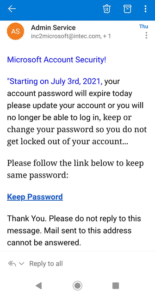
Office Watch readers have sent us timely reminders of some common scams targeting Office 365 and Microsoft customers. In both cases criminals impersonate Microsoft to trick people out of passwords or money. Microsoft call scams First up, a report from an anonymous reader … “ Somebody from Microsoft called and that we get a refund of 300.00 […]

You can protect yourself from Microsoft Office phone scams
Criminals try using Microsoft Office to get money from you using various phone scams impersonating Microsoft. Here’s how to protect yourself. Scammers are clever, sophisticated and look very sincere. Often there are stark warnings about dire consequences. In the end they want your money, infect your computer, steal your personal information or all three. The […]

Stop or change new email notifications from Outlook
New email notifications in Outlook can be quite distracting, especially in Windows. Here’s how to stop them or change the notices to make them less distracting and suit you better. Or just change the new email sound to something you prefer. The default email notification appears in the bottom right corner. If you’re trying to […]
The Tyranny and History of Spreadsheets over 700 years
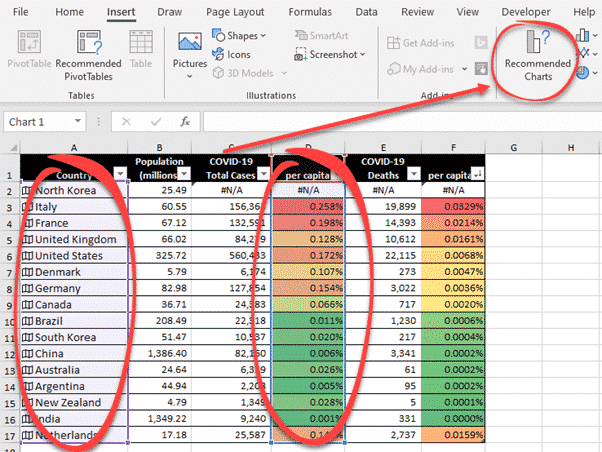
Tim Harford has an interesting long read on spreadsheets from its origins in the late 14th Century Italy to modern Excel with diversions into smallpox, Enron, Covid and even teasing Bill Gates. The Tyranny of Spreadsheets is on the Financial Times web site. It’s usually firewalled but the link should, hopefully, show the article. Harford […]
Sending a complete Word document – fonts and all
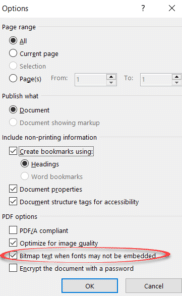
How to embed the necessary fonts into a Word document so everything is included that the receiver needs to view and edit it. You’ve made a document, it looks great and you send it off to someone or a print shop. They call complaining that it looks weird and claiming that you don’t you know […]

Make a self-running or kiosk display in PowerPoint
PowerPoint can show slides on a screen as a high-tech signboard, using a self-running presentation known as Kiosk display. Here’s how to do it plus all the settings and tricks available. We’ve all seen screens displaying information on a series of slides – maybe in a shop or conference. Maybe as a prelude or postscript […]
How to add many OneDrive accounts to a single device
OneDrive has quietly boosted one of its most important features, the ability to synchronize more than one account on the same computer or portable device. Here’s how for Windows, Mac, iPhone, iPad and Android. It’s possible to sync almost all the OneDrive accounts you have access to. A personal OneDrive account plus many work/school accounts. […]
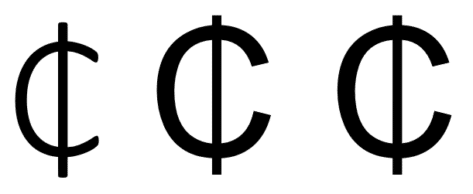
How to type the Ghana Cedi symbol
How to type Ghana Cedi currency character in Windows or Office, especially Word. After our article about inserting Numero and other symbols into Office – trust an Office Watch reader to find a character not available in a supplied Windows / Office font: ” The currency in Ghana is the Cedi. The symbol used is […]

Practical options for Footnotes to Word tables
Microsoft Word has footnotes and endnotes features but it’s surprisingly clumsy when it come to the common need for footnotes immediately after a table. Normally, Word puts Footnotes at the bottom of the page but for tables (and occasionally pictures or diagrams) you want them immediately after the table like this: Doing that is possible […]









