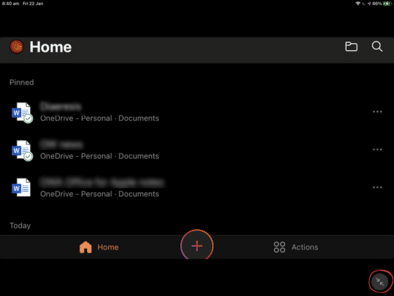
Four ways to put Microsoft Office on your iPad
You have an Apple iPad but do you know all the different ways that Microsoft Office can run on an iPad. There are four different options, some free and others you have to pay for. Why bother? Surely you just install the Office mobile apps and that’s it? Sadly no, and there are advantages to […]

Three ways to make an auto-update unique list in Excel
Making unique (not duplicated) list in Excel is possible in three ways that update automatically. One is headspinningly hard. One has some minor quibbles. The best option is a lot easier and relatively new in Excel. We’re talking here about making a list of unique (non-duplicate) values which update automatically if the source list changes. […]

Extra symbols with Segoe Fluent Icon font for Word & Office
Segoe Fluent Icon is a handy extra symbols font with some icons that aren’t easily available anywhere else. It’s free for Windows and Mac. Here’s how to use it in Word and Office. Segoe Fluent Icons is intended for use by developers making their Windows apps but there’s no reason why you can’t use them […]
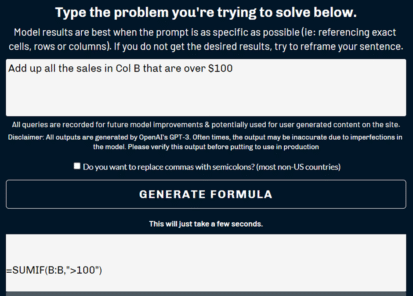
Easy way to convert sentences into Excel formula
There’s a way to convert a sentence into an Excel Formula using modern AI. You’d expect this to come from Microsoft but instead it’s the work on one smart man who has made the Excel Formula Bot. David Bressler has created a way to turn human sentences into an Excel Formula at https://excelformulabot.com/ It’s interesting […]

Smiling Face with Open Mouth and Smiling Eyes 😄 emoji in Office
Type the Smiling Face with Open Mouth and Smiling Eyes 😄 into Microsoft Word, Excel, PowerPoint or Outlook. Both in Office for Windows and Office for Mac. Smiling Face with Open Mouth and Smiling Eyes 😄 emoji is used to express genuine joy, laughter, or excitement. It’s just one of the many ‘Smiling’ or ‘Grinning’ […]

Section Symbol § in Word, Excel, PowerPoint and Outlook
Section Symbol § can be typed into Microsoft Word, Excel, PowerPoint or Outlook. Both in Office for Windows and Office for Mac. Section Symbol § is used for referencing numbered sections of a document, such as US legal code e.g “ 50 U.S. Code § 1861 “ . § in Footnotes It can also appear as […]

Blocking Office VBA macros resumes but why?
Microsoft has resumed rollout of their new Office macro blocking system after the feature was mysteriously suspended a few weeks ago. But why? Microsoft hasn’t explained why they stopped the new macro blocks and their reason for restoring the feature is both incomplete and nonsensical. The new system totally blocks Office documents with macros and […]
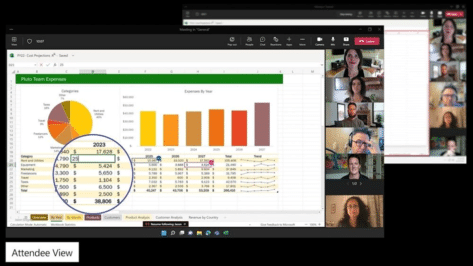
About Excel Live worksheets in Microsoft Teams
Excel Live is a new way to fully cooperate on a worksheet while in a Teams meeting. It’s always been possible to show an Excel worksheet in a group video meeting by one person sharing their screen which has Excel open. Excel Live lets you open a worksheet in a separate window that can be […]

Better text conversion options coming to Excel
Microsoft was addressing the long-standing problems with Excel 365 importing text files (.CSV) by adding some options to prevent common conversion problems. The ‘Automatic Data Conversion’ choices are welcome, but you’re still better using other, safer, Excel import options. NOTE: this feature has been quietly dropped by Microsoft. The Automatic Data Conversion options do not […]

Grinning Face with Smiling Eyes 😁 emoji in Word, Outlook and Office
Insert the Grinning Face with Smiling Eyes 😁 into Microsoft Word, Excel, PowerPoint or Outlook. Both in Office for Windows and Office for Mac. Grinning Face with Smiling Eyes 😁 emoji is used to express joyfulness, excitement, or happiness. It’s similar to Grinning Face 😀 but with different eyes that are meant to be ‘smiling’. It’s just […]

Microsoft reverses Office macro blocks without telling customers
Without any warning, Microsoft stopped their new macro blocking system (called MOTW or Mark of the Web). Now Office for Windows is less secure without customers getting any warning. UPDATE: the whole ‘on again, off again’ saga continues. On 20 July 2022, Microsoft resumed rollout of the MOTW and Office macro blocking. Back in February, […]

Excel cells are white or disappearing bug – how to fix
Excel 365 for Windows users might have received a nasty shock in the last few days with their cells disappearing behind white or grey. Here’s what happened, how to fix it plus wondering why it took Microsoft over a week to push out the fix. Here’s an example of the Excel bug in action Whole […]

Make a gauge, dial or speedometer chart in Excel
Officially a Gauge, dial or speedometer chart isn’t available in Excel. It’s a glaring omission from the in-built Excel charts but happily, it’s still possible with a little Excel trickery explained in this article. A “speedo” (Aussie slang), dial or gauge chart is made with a combination of Excel’s Doughnut chart and a Pie Chart […]

Grinning Face with Big eyes / Smiling Face with Open Mouth 😃 emoji in Office
Add the Grinning Face with Big eyes aka Smiling Face with Open Mouth 😃 into Microsoft Word, Excel, PowerPoint or Outlook. Both in Office for Windows and Office for Mac. “Smiling Face with Open Mouth” is the official Unicode name for the 😃 emoji. It’s commonly labelled Grinning Face with Big eyes and is used […]

Get the latest Aussie census data in Excel
Australian data nerds rejoice! The first load of data from the 2021 Census has been released in a format ready for Excel. Here’s how to get it and look at the detailed statistics for yourself. The Australian Bureau of Statistics has just released the first block of data from the 2021 count with more to […]
Why does a document look different on other devices
Reasons why a Word document or email can look different on one computer than another device and what you can do get ‘fidelity’ or the same look across many machines. In short – you can’t assume that what you see is the same as someone else. You get a document sent to you or maybe […]









