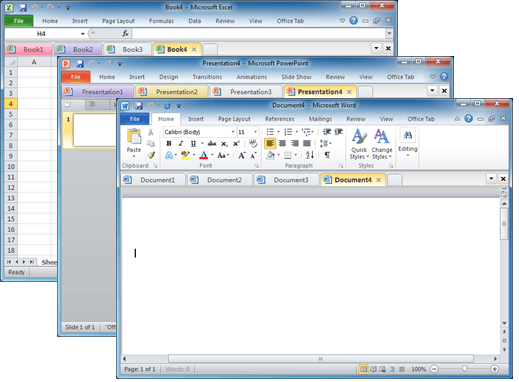
Documents in tabs option for Microsoft Office
There’s a useful and long-standing Office add-on for people who have many documents open at once and prefer them to appear in tabs (like web pages) instead of separate windows. Office Tab switches Microsoft Office for Windows from the usual ‘one document per windows’ view to ‘many documents in a single window’. This can be […]

The full story on Dictate with Office 2013 & Office 2016
Microsoft released an interesting new tool for Office 2013/2016 which promised to be a major improvement on current ‘speech to text’ options. Most media have just reported Microsoft’s hype, we actually tested Dictate and here’s what we’ve found. What made Dictate different is the use of Cortana voice recognition technology. It uses the same cloud […]

Save Office images or slides to SVG format
Microsoft Office 365 and Office 2021 let you save images to SVG format from either images/graphics, charts or whole slides from PowerPoint. Originally ‘Save As SVG’ was only in PowerPoint 365 Windows but it’s quietly spread to Word 365, Excel 365 and Outlook 365 as well as the Office 2021 apps. SVG is a scalable […]

Printing tricks for Microsoft Word and Office
There’s a lot more printing and money saving options available if you know where to look or use a little cunning to get what you want. Microsoft Word documents with rescaling paper size, saving money in ink or toner, double-sided printing, two pages to a sheet, poster sizes and booklets. There are ways to save […]
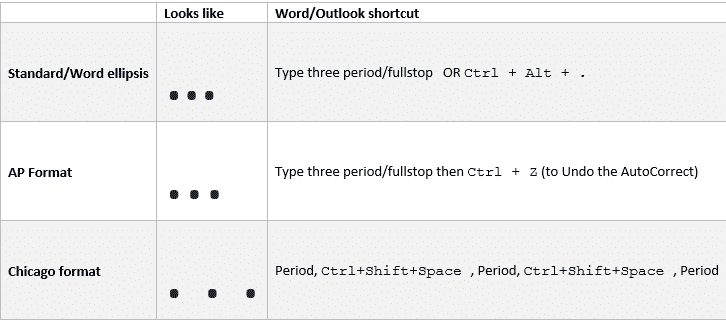
Ellipsis … symbol in Word, Excel, PowerPoint and Outlook
Type the three different types of Ellipsis … marks in Microsoft Word, Excel, PowerPoint or Outlook. Both in Office for Windows and Office for Mac. Ellipsis … symbol is used for a gap or break in some text, usually to drop out some irrelevant text or speech. The same applies in maths e.g. 1,1,2,3 …. […]

Comma Ellipsis ,,, in Word and Office
Like it or loath it but the comma ellipsis has arrived ,,, as an alternative to the more common ellipsis with dots. Here’s how to use it in Word and Office. The comma ellipsis is a modern, more casual version. It’s used as a more dramatic, even annoyed trailing off of a thought, compared to […]
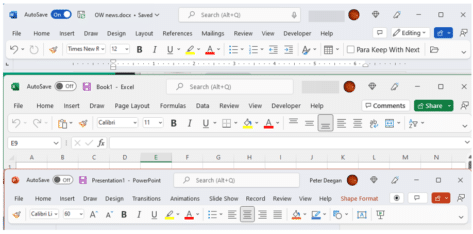
See the ‘simplified’ Office toolbar for Microsoft 365
The latest Microsoft Office 365 for Windows has a new and, to date, undocumented, toolbar or “personalized Office experience”. This ‘toolbar just for you’ is both more and less than it appears. The toolbar is an effort to declutter the top or title bar of the Office apps. Microsoft has crowded out the title bar […]
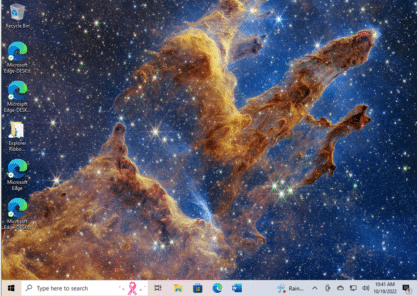
Get the Pillars of Creation on your computer or slide
The latest from the James Webb Telescope is wonderful, a new look at the “Pillars of Creation”. A photo from 6,500 light years away which you can add to your computer or PowerPoint slide in seconds from the original source. The image has appeared on many web sites at reduced sizes and resolutions. Far better […]

Ten Microsoft announcements in brief
Last week Microsoft made a series of announcements of new and changed features in Microsoft Office and Microsoft 365. Here’s a brief roundup of what the main ten promises and what they mean for you (if anything). The important word is ‘announcement’. Almost all the statements are about future arrivals, not available now. A lot […]

Microsoft Office and Oreos combine with Clippy – no joke
If you thought the modern world could not get any stranger, we’ve got bad news. Microsoft Office and Oreos (the chocolate cookie) have combined for a marketing stunt with online events (sorry “snack breaks”), special packs, tchotchke and emoji. Poor old Clippy has been dragged in as well. On the practical side, we’ll show how […]
Merge or Split cells in Word and PowerPoint tables
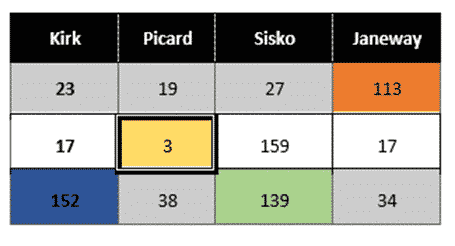
Combine or divide adjacent Microsoft Word or PowerPoint table cells into a merged single cell or split a cell in two. Welcome to ‘Merge Cells’ where you can combine adjacent cells into a single cell. It’s very handy for table formatting tricks and other unusual situations like a longer than common text label. Or a […]
Yen ¥ symbol in Word, Excel, PowerPoint and Outlook
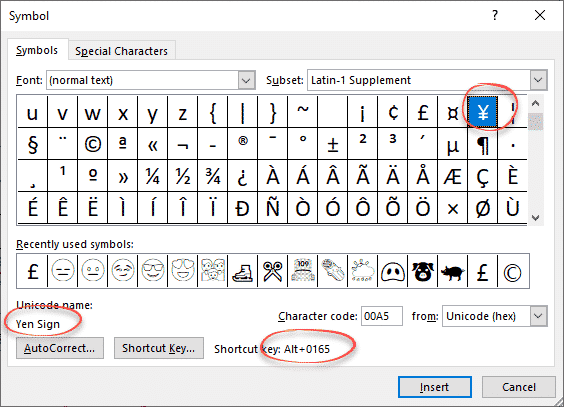
Type the Yen ¥ currency symbol into Microsoft Word, Excel, PowerPoint or Outlook. Both in Office for Windows and Office for Mac. Yen is used for Japanese currency and the Chinese Renminbi / Yuan. Microsoft Excel also offers the Yen symbol for Mongolia even though the tögrög currency uses another symbol. ¥ symbol is easy […]

PowerPoint ending slide ideas
More ideas and a wish list for ending a PowerPoint presentation with a different slide. After our article on the ending slide options for PowerPoint, Vivian from the UK writes: “… it’s really very easy to do what I always do at the end of PPT presentations. Just add a new blank slide – which […]
Avoid the black slide at the end of a PowerPoint slideshow
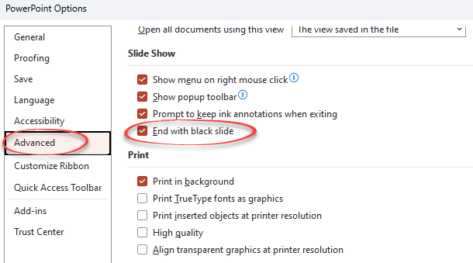
The blank black slide which appears usually at the end of a slideshow is a default setting in PowerPoint. But it can be changed. The blank black slide which appears usually at the end of a slideshow is a default setting in PowerPoint. But it can be changed. Open PowerPoint 365, PowerPoint 2021 back to […]

Murphy Brown look in Word or PowerPoint
Recreate the Murphy Brown TV show’s look as a design inspiration for Word and PowerPoint – the fonts, colors and lines. You may not want to use the exact look of the Murphy Brown title card, but it’s a starting point for design variations of your own. We’ll show how to make a similar look […]
Change default slide number in PowerPoint
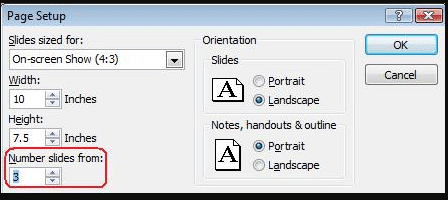
How to change the PowerPoint slide numbering to a different start number. In PowerPoint, slides are numbered by default from 1 but that’s not always what you need. For example, you’re working on some slides which are just part of a set of slides eg. working on slides from number 15 to 20 separately. To […]









