Office 2021 is the personal and small business ‘perpetual licence’, non-subscription version of Microsoft Office. For Windows and Mac.
Office LTSC (Long Term Servicing Channel) is the volume licence ‘perpetual licence’, non-subscription version of Microsoft Office for organizations, companies and governments. Also for Windows and Mac.
The features in Office 2021 and Office LTSC are very similar, if not the same.

Transparency Color problem and fix for Microsoft Office
The picture option ‘Set Transparency Color’ doesn’t always work properly in Microsoft Office. We’ll explain the problem and suggest some fixes. When we were making our article “Make a transparent shape to mask a photo in Word, PowerPoint and more” we discovered that the ‘Set Transparent Color’ option didn’t work fully as needed. ‘Set Transparent […]
Beware OneNote .one files as virus carriers
Recent investigations have revealed some worrying truths about the risks in opening OneNote notebooks, a surprising fact about .one files, some bad news and good news. Criminals are increasingly sending out nasty OneNote .one files in emails, taking advantage of another Microsoft security ‘blind spot’. OneNote Embedded File Abuse from Nicholas Dhaeyer at NVISO Labs […]

Ctrl + Enter shortcut in Outlook for Windows
What does Ctrl + Enter do in Outlook for Windows and why doesn’t it always work? What’s the equivalent in Outlook for Mac? Ctrl + Enter can be a shortcut in Outlook to send a message after you’ve finished typing. However Ctrl + Enter isn’t always available — in Outlook it can be turned off. […]
Citation and Bibliography tools beyond Word
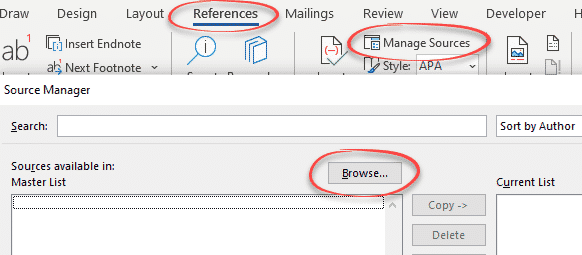
Word’s Citation and Bibliography support is enough for some people, but not for everyone so here are tools available to go beyond what Microsoft provides. See Add a Bibliography to Word documents Custom Bibliography formats or styles in Word Citations for everyone in Word Source Manager for citations in Word JabRef JabRef is the commonly used, […]

A simple check for Plus addressing with your email address
There’s a simple way to tell if your mailbox has the useful plus + address feature. Plus email addressing (aka disposable or sub-address) is sometimes available automatically (Gmail or Outlook.com) or has to be switched on (Microsoft 365 hosting). Some other mail hosts might have an option to allow plus + addresses for your mailbox. […]
Indexing ‘bug’ in Microsoft Word tables
A peculiarity of indexes when you use big table cells to format your Microsoft Word document — and a suggested solution. Karen from New Mexico wrote to us describing a strange behavior in her Word document indexes. The documents are class handouts with each topic as a new row in a two column table. This means […]

Make and customize your own tab on Office Ribbon
Have all your favorite Office features and buttons in one place. Commonly used buttons or options that aren’t on the regular ribbon. The Office ribbon lets you make a personal tab filled with your choices. We will show you how easy it is to make in Word below, but this can also be done the […]

How to add a Drop Down List in Word
A Word Drop-down list lets you quickly choose one of several options. It’s a fast way to make new documents with a standardized pattern. Don’t be scared, it’s easy to create even though the word ‘Developer’ is involved. We’ll show you how to make drop-down lists, change the bland ‘Choose an item.’ default text and […]

Add different symbols for each bullet in Word or PowerPoint list
How to make a bullet list that has different bullet symbol or emoji for each Word or PowerPoint line. With the wide range of symbols and emoji in Word and PowerPoint there’s scope for creative lists that use symbols that relate to each line. It’s not possible to do that as a normal bullet list. […]

Type double circled digits in Word, Excel and more
Insert digits with double circles from ⓵ to ⓽ in Microsoft Office, Word, Excel, Outlook etc. Use them as an alternative way to number a list like this … Double Circled digits in different fonts Only two common Office fonts have double circled digits Segoe UI Symbol and Calibri. Here’s how the symbols look in both […]
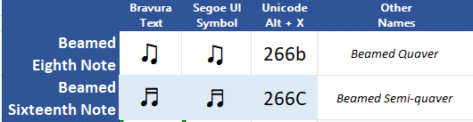
Beamed ♬ Musical Notes ♫ in Word, PowerPoint and More
Type beamed ♫ or joined ♬ musical notes into Word documents, Excel worksheets, PowerPoint slides or emails. It’s possible to type musical notes and other notation in Word documents. Full musical scoring isn’t practical (there’s other software). Unicode only has two ‘beamed’ or joined musical notes, the Eighth or Quaver and the Sixteenth of Semi-quaver. Beamed musical notes different in each font […]

Musical 𝅘𝅥𝅮 notes 𝅘𝅥𝅰 in Word, Excel and more
Type musical notes from breve 𝅜 (double whole note) to the semihemidemisemiquaver 𝅘𝅥𝅲 (128th note) in Microsoft Office, Word, Excel, Outlook etc. It’s possible to type musical notes and other notation in Word documents. Full musical scoring isn’t practical (there’s other software). How musical notes look in different fonts. Most fonts don’t include musical notes. The only common Office font that […]

Jeopardy! clue cards, make your own in PowerPoint and Word
How to make clue cards like the Jeopardy! TV show to use in PowerPoint or Word. Clue … it’s not as straightforward as you might think but we’ll take you through the steps and tricks. Use the well-known format to pose questions for your PowerPoint audience or as a section/chapter heading. Let’s go through the […]

Is “data” singular or plural – let Microsoft Word decide
Is the word ‘data’ singular or plural? It’s one of those changing usages of the English language that reasonable people disagree on. What does Microsoft Word’s grammar and style say … “Data is ..” or “Data are …”? The UK Financial Times has just changed its style guide to say that ‘data’ is always singular. […]

Adding a time zone to Outlook
Outlook for Windows has the ability to select the time zone for an appointment, but what if the zone you need isn’t on the drop down list? Until Outlook 2007, Outlook only knew about one time zone and that’s the one currently set for Windows. All appointments are presumed to be in the current time zone […]

Quickly add images with PowerPoint’s Photo Album
There’s a fast way to add many photos to a PowerPoint presentation using the long-standing Photo Album feature. Since at least PowerPoint 2003, there’s been a Photo Album option in PowerPoint for Windows. It’s a fast way to add many photos to a presentation. Alas, it’s not available in PowerPoint for Mac or in a […]