Office 2021 is the personal and small business ‘perpetual licence’, non-subscription version of Microsoft Office. For Windows and Mac.
Office LTSC (Long Term Servicing Channel) is the volume licence ‘perpetual licence’, non-subscription version of Microsoft Office for organizations, companies and governments. Also for Windows and Mac.
The features in Office 2021 and Office LTSC are very similar, if not the same.

Powerpoint: make your mouse like a Laser Pointer
One of the eye-catching features since PowerPoint 2010 right up to PowerPoint 365 is turning your mouse into a virtual laser pointer. A ‘laser pointer’ transforms the boring mouse pointer to something striking and easier to see on the screen. This is especially useful while delivering presentations as it eliminates the need to carry additional […]

Array Formula with IF filter in Excel
Excel Array formulas are useful for getting the result from a filtered list quickly with a single, simple formula. Continuing our series on Excel array formulas. Here’s a list of stocks with industries aka Table3. How many stocks are in the ‘Shop’ industry? The array formula in G5 has the answer from the formula: =COUNTIF(Table3[Industry],G4) […]
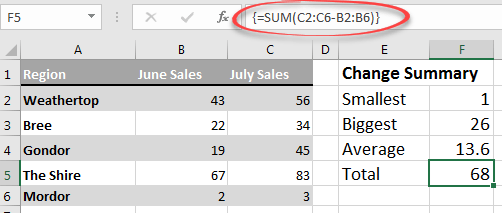
Excel Array formulas for everyone
Array formulas are an important part of Excel and they are a lot more important now that dynamic array formulas are around. Don’t ignore arrays because they’re an unavoidable part of Excel for everyone. This is the start of a series to help you understand arrays in Excel. At the very least, you’ll know what […]
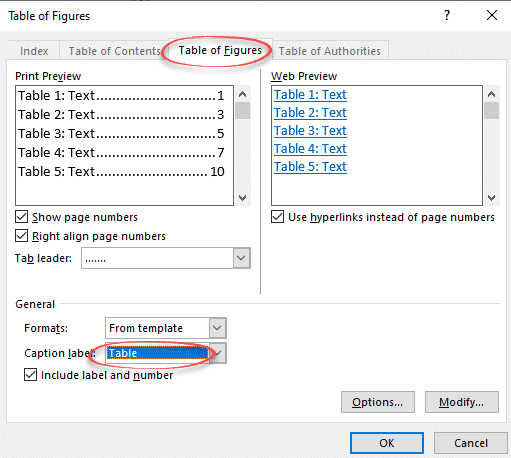
Make a List or Table of tables in a Word document
Word can generate a list of all the tables in a document. Like a Table of Contents, this list of tables or Table of tables can include page references or links to each table. A Table of tables can be useful for creating a proper appendix or reference within more formal documentation. It can be […]

Three ways to view multiple Outlook calendars
Outlook can handle more than one calendar and has three options for easily viewing them, either individually or combined. Calendars can be displayed side-by-side or the more useful Overlay option. There’s also the ‘New Window’ option. Choosing the Outlook calendars to view In Outlook calendar view, use the check boxes in the calendar list to […]

Add an Internet shared calendar to Outlook
Outlook can link to external, shared, calendars and copy any updates to that calendar using either a .ics tile or a webcal link. An Internet calendar can be for public events, holidays, sporting fixtures etc. They can be a one-time copy of event details or you can setup Outlook to check for updates to […]

Pilcrow Sign ¶ emoji in Word, Excel, PowerPoint and Outlook
Type the Pilcrow Sign ¶ into Microsoft Word, Excel, PowerPoint or Outlook. Both in Office for Windows and Office for Mac. Pilcrow Sign ¶ is a typographical symbol sometimes called a paraph, or blind P In typography ¶ marks the start of a paragraph but in Microsoft Word the Pilcrow Sign ¶ marks the END of a paragraph. […]

Better Excel formula converts days into Years, Months, Days
Here’s a better Excel formula for converting a number of days into text for year, months and days. This formula leaves out zero values and proper singular/plural (e.g. not “1 Year 0 Months 27 Days” but “1 Year 27 Days”). And we’ll show an even better way to write the formula in Excel 365, 2021/LTSC […]

Two ways to view a Visio file free
Anyone can view a Microsoft Visio file, once you know at least one of two tricks available. One is free software, the other is a workaround via OneDrive. “I’ve been sent a .vsdx file to view and I’ve figured out it’s a Visio file – but how can I view it without paying for Visio?” […]
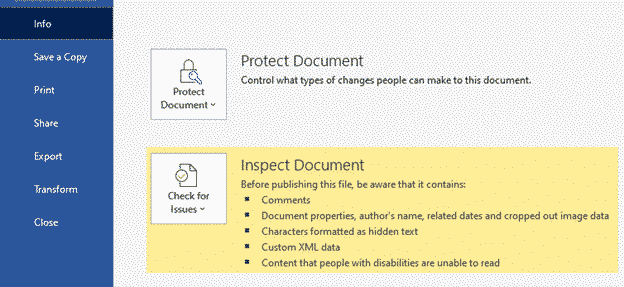
How a deleted Word document caught a serial killer
A Word document and a floppy disk caught a serial killer back in 2010. There are still lessons for anyone wanting to keep their personal or business data confidential. Known as the ‘BTK killer’, he murdered 10 people in Kansas between 1974 and 1991. The murderer was finally caught in 2004. He liked sending notes […]

Protect yourself buying Microsoft Office from Amazon or Ebay
After the report of pirated / illegal Microsoft Office from an Amazon retailer (and Amazon’s initial refusal to act) how can you protect yourself from a similar problem on Amazon or other sites? Your entitlement to a refund or redress for a illegal product is different depending on whether you buy from Amazon itself or […]

How to ‘ignore’ emails in Outlook
Occasionally you’ll get someone who sends lots of messages you don’t want to see. Outlook has a few options for refusing or politely ignoring messages from certain email senders – either individually or automatically. Most commonly these are enthusiastic zealots on some subject and are trying to ‘spread the word’ on their pet subject. They […]
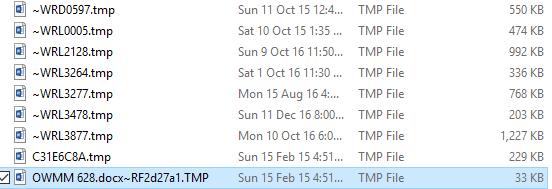
What are .tmp files in MS Office document folders?
If you look in folders that contain Office documents (Word, Excel, PowerPoint) you might see the occasional .tmp file. What are they? Could they be useful? How to look inside. Can they be safely deleted? The quick answers are: probably Word or Office document remnants, could be handy to recover a lost document but otherwise […]

Formatting email Invitations in Outlook
Meeting or party invitations don’t have to be plain, old white background emails, go for something a little more fancy or useful. Officially, Microsoft suggests using their Stationery themes to change the look of an email. But that’s not available for invitation emails. There are some formatting choices also missing from invitation emails. Whenever formatting […]
Outlook checks for incoming attachments like .doc .xls .ppt
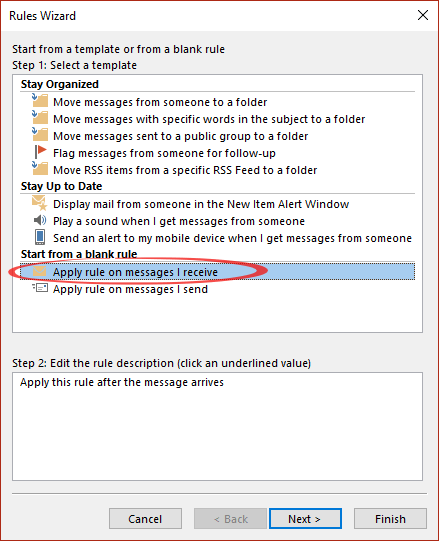
We’ve warned against incoming ‘old’ Office documents (.doc .xls etc) because of the virus risk, so how can you setup Outlook to warn you about emails with those attachments? Sadly, it’s not easy. Outlook has automatic Rules to check incoming messages, but none of those rules can test for the file extensions on email attachments. […]

Beware .doc files in emails
Many of the dangerous emails arriving in your Inbox have one thing in common — they use the old (and risky) Word .DOC format. .DOC .XLS or .PPT are exactly the sort of email attachments you should avoid. The main ‘red flag’ is the email attachment of a .DOC file (or .XLS or PPT). These […]









