Word in a web browser has a Designer feature, like Designer in PowerPoint, to quickly make great looking documents. Designer uses Microsoft’s templates collection to suggest formatting and design change for the document. One problem with Designer, like similar Office features, is that they can be overused and too many
All you need is a birth date or starting date and Excel can figure out the age, next birthday, days to next birthday or when you reach a milestone like 10,000 or 15,000 days. That’s just some clever tricks with DateDif(). How old is someone or something? To calculate the
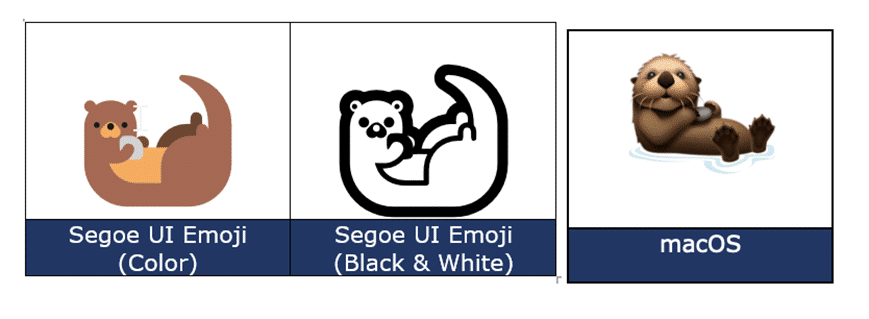
Type the fun Otter 🦦 emoji into Microsoft Word, Excel, PowerPoint or Outlook. Both in Office for Windows and Office for Mac. Otter 🦦 emoji represents a light-brown otter (a member of the weasel family) on its back with its paws held together. But the emoji can just be used
Excel doesn’t automatically number lists but there are at least six ways to add numbering depending on your needs and how the list appears. Numbering is important but can be annoying when you’ve got a large dataset. If it’s small, it’s easy to number it manually or by an auto-filling
Add the Duck 🦆 emoji into Word, Excel, PowerPoint or Outlook. Both in Office for Windows and Office for Mac. Duck 🦆 emoji represents the quacky bird with webbed feet. The emoji is usually depicted as a Mallard. Sometimes used as a substitute for the f-word, because of iPhone’s tendency
Like Word, PowerPoint and Excel also have options to add borders to pictures to add that extra oomph to your work. Users can choose between fairly simple borders or add some further complex, fancy styles to their images. If all this seems very familiar, it’s because the same picture tools
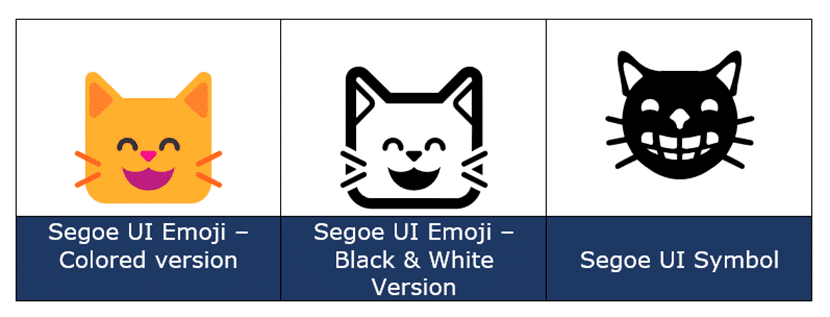
Type the Grinning Cat with Smiling Eyes 😸 emoji into Microsoft Word, Excel, PowerPoint or Outlook. Both in Office for Windows and Office for Mac. Grinning Cat with Smiling Eyes 😸 emoji is a variant of the grinning face emoji or the cat face emoji, which is yellow on most
There are a couple of email preview options in Outlook. These include the Message Preview and using the Reading Pane (once called the Preview Pane). We’ll explain them in detail including how to turn these features on and off plus viewing attachments in the Reading Pane. Message Preview Message Preview
In Microsoft Word, circling around text can place emphasis or enhance the text appearance. There are a few methods you can choose in Word documents and you’re not limited to circles. We’ll show how to add a simple circle like this, plus a lot more. Add shape to document Go
How to insert the Rainbow 🌈 into Microsoft Word, Excel, PowerPoint, or Outlook. Both in Office for Windows and Office for Mac. Rainbow 🌈 emoji depicts a colorful arc of a rainbow, usually used to express positivity, hope, good fortune. The rainbow flag was designed and has been adopted by
Here’s how to start page numbering at any point in a Word document. There’s no rule which says that visible page numbering has to start with Page 1, there are many situations where the first page in Word isn’t ‘Page 1’ as labelled in the header or footer. Some opening
If you thought dividing one number by another was simple, think again. Excel has five different ways to divide numbers and we’ll explain them all. Basic Division Obviously, there is the basic concept of division in Excel using / in a formula. Like in Excel we can use the formula
Type the OK Hand sign 👌 into Microsoft Word, Excel, PowerPoint, or Outlook. Both in Office for Windows and Office for Mac. OK Hand sign 👌 emoji is mostly used to symbolize approval, agreement, all that is well but there are other meanings. Scuba Divers use 👌 hand sign to
How to insert the Cat Face 🐱 into Microsoft Word, Excel, PowerPoint or Outlook. Both in Office for Windows and Office for Mac. Cat Face 🐱 emoji is a variant of the grinning face emoji, usually depicted as yellow on all platforms. How Cat Face 🐱 looks in different fonts.
All about the \# formatting switch in Word field codes lets you change the look of numbers in many different ways. Many examples plus a guide to the formatting codes. Use these options with Word fields that return a number like SEQ, REF, PAGE, SECTION, SECTIONPAGES, AUTONUM, EDITTIME, FILESIZE and
Excel 365 makes it incredibly easy to get past price and volume info for stock, fund and currency exchange data, then convert that into a professional-looking chart. Some may remember the days when stock prices were added manually from a newspaper. Now a single Excel cell formula can grab the
Replacing images in Word, PowerPoint, Excel and Outlook is a lot easier using the ‘Change Picture’ option, especially now you can change to insert an image on your clipboard. We’ll show you a step by step on how to do it. There might not be one simple keyboard shortcut, but
Ever been confused by the \* formatting options in Word field codes? You’re not alone, believe me. Here’s a complete guide with the \* codes and examples of how they appear. In this article we’ll look at the named formatting codes which start with \* like \* Arabic and \*
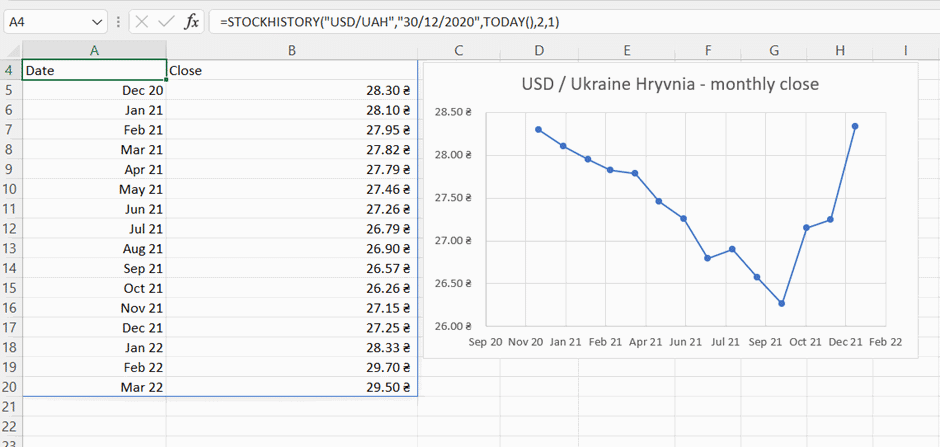
StockHistory() is an Excel function that can add historical stock price info, as well as currency exchange rates at monthly, weekly or daily intervals. Date and Closing Price plus optionally Open, High, Low and Volume. All ready to make a chart for stock price analysis. Excel 365 has Stock and
Type the White or outline Chess King ♔ into Microsoft Word, Excel, PowerPoint or Outlook. Both in Office for Windows and Office for Mac. White Chess King ♔ symbol is useful for users that want to represent the chess piece as a symbol, rather than an image. There’s also a
Word and Office have several down “pointing hand” symbols available in some fonts. Here’s the Unicode options explained and shown with the codes and shortcuts to type them in Excel, PowerPoint and Outlook too. There are various pointing hand options in Unicode: Index – a pointing index finger with palm
If you’ve ever needed to split dates in Excel into separate day, month, and year, there are several options to choose from. Excel has different functions, Text to Columns or Flash Fill which can do the job. Here’s a quick guide on several methods: Using the DAY, MONTH and YEAR
Insert the Eye of Horus 𓂀 into Microsoft Word, Excel, PowerPoint or Outlook. Both in Office for Windows and Office for Mac. Eye of Horus 𓂀 is an Egyptian Hieroglyph symbolizing protection. According to Egyptian myth, Horus lost his left eye during his struggle with Seth, and it was restored
Using simple animations in PowerPoint presentations is relatively easy, but you can also take them to the next level, to jazz up your photos in PowerPoint. Using this method might take a few more steps than just creating a straightforward animation, but the result is well worth it … In