Office 2021 is the personal and small business ‘perpetual licence’, non-subscription version of Microsoft Office. For Windows and Mac.
Office LTSC (Long Term Servicing Channel) is the volume licence ‘perpetual licence’, non-subscription version of Microsoft Office for organizations, companies and governments. Also for Windows and Mac.
The features in Office 2021 and Office LTSC are very similar, if not the same.

Table Cell Margins and Spacing Options in Word
Cell Margins and Cell Spacing are two important settings in any Microsoft Word Table but they aren’t used much and not well understood. Cell margins are the spaces between your text and the edge of the cell. They can be set separately for the top, bottom, and either side of the cells. To change the […]
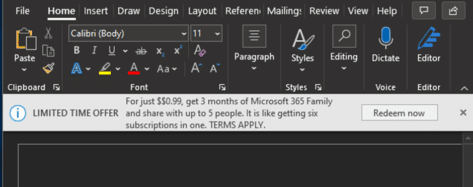
Microsoft 365 ads appearing in Office 2021
Microsoft has started dropping ads into Office 2021 in another attempt to switch customers off single-payment Microsoft Office and on to the annual ‘subscription’ Microsoft 365. UPDATED: this article now updated after hearing from some Office Watch readers (always a handy way to find out what’s really happening with Office software!). Office 2021 users are […]

Expanding a Master Document in Word
When you open a master document in Microsoft Word it might give you a scare. Instead of showing the document text all you see is some links. All the subdocuments will appear as hyperlinks in the master document. To see the entire master document with sub-documents go to View | Outline. The Outlining bar will […]

Three ways to make an auto-update unique list in Excel
Making unique (not duplicated) list in Excel is possible in three ways that update automatically. One is headspinningly hard. One has some minor quibbles. The best option is a lot easier and relatively new in Excel. We’re talking here about making a list of unique (non-duplicate) values which update automatically if the source list changes. […]
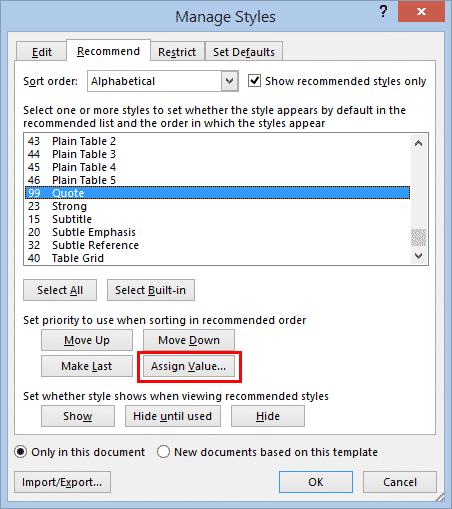
Rearrange and fix Word’s Styles Gallery
Microsoft Word’s Styles Gallery can be fixed to show the styles you want, rearrange to the order you want, not the collection and order decided by Microsoft. It makes sense to have the styles you use most frequently in a prominent place in this panel, and Word allows you to both add styles to the gallery, and to […]

Extra symbols with Segoe Fluent Icon font for Word & Office
Segoe Fluent Icon is a handy extra symbols font with some icons that aren’t easily available anywhere else. It’s free for Windows and Mac. Here’s how to use it in Word and Office. Segoe Fluent Icons is intended for use by developers making their Windows apps but there’s no reason why you can’t use them […]

Make fancy text with OpenType Ligatures in Word
An easy way to make fancy text, especially headings, with extra style and flourish is with the OpenType Ligatures in Word for Microsoft 365, 2021 and earlier versions of Word including Word for Mac. Microsoft Word supports OpenType Ligatures. Apart from Word, OpenType Ligatures are also applicable in Publisher and, to a limited extent, Outlook […]
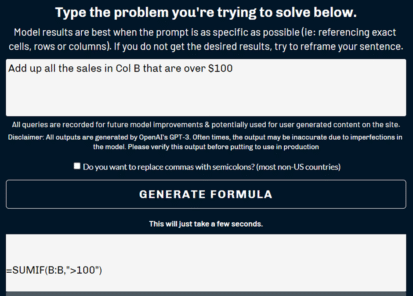
Easy way to convert sentences into Excel formula
There’s a way to convert a sentence into an Excel Formula using modern AI. You’d expect this to come from Microsoft but instead it’s the work on one smart man who has made the Excel Formula Bot. David Bressler has created a way to turn human sentences into an Excel Formula at https://excelformulabot.com/ It’s interesting […]

I Love … variations in Word or PowerPoint
Once you have the basic setup for the I ♥ or I Love … sign, the fun begins. Making your own variations for a Word document or PowerPoint presentation. Start by making your own I ♥ or I Love … sign based on the original I Love NY logo. Font variations Simply changing the font […]
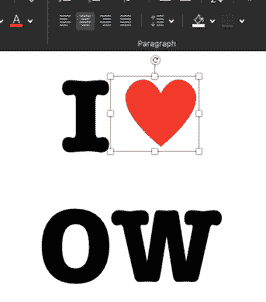
Make your own I ♥ Love…. Signs in Word
It’s pretty easy to make a similar I ♥ or I Love logo, in Microsoft Word or PowerPoint. It’s even a little easier for Mac users. Check out Making the original I Love NY sign to see how the original logo is put together. We’ll show you the little subtleties and design tweaks needed in […]

How the famous I ♥ Love NY logo was put together
Here’s the design details of how the famous I ♥ NY / I Love NY logo was made. The font, colors, symbols and how they come together to make an iconic sign imitated all over the world. The logo was created by Milton Glasner in the back of a taxi but these days all you […]

Smiling Face with Open Mouth and Smiling Eyes 😄 emoji in Office
Type the Smiling Face with Open Mouth and Smiling Eyes 😄 into Microsoft Word, Excel, PowerPoint or Outlook. Both in Office for Windows and Office for Mac. Smiling Face with Open Mouth and Smiling Eyes 😄 emoji is used to express genuine joy, laughter, or excitement. It’s just one of the many ‘Smiling’ or ‘Grinning’ […]

Behind letters, characters and emoji is Unicode
There’s an interesting New York Times piece on the Unicode standard that’s used by Office, Windows, Mac and other computer systems. Unicode is the global standard for identifying letters, symbols and characters across many computer systems. It’s how very different devices can identify the letter A, Euro currency symbol or even a Recycling symbol in […]

Section Symbol § in Word, Excel, PowerPoint and Outlook
Section Symbol § can be typed into Microsoft Word, Excel, PowerPoint or Outlook. Both in Office for Windows and Office for Mac. Section Symbol § is used for referencing numbered sections of a document, such as US legal code e.g “ 50 U.S. Code § 1861 “ . § in Footnotes It can also appear as […]

Upside-down or Spanish Exclamation mark in Word
The inverted or Spanish exclamation mark ¡ is available in Microsoft Word, regardless of language setting. There’s even an in-built shortcut. ¡ is most commonly used in Spanish for the start of an exclaiming sentence. As far back as the 1660’s there have been attempts to introduce ¡ inverted exclamation to denote irony. Despite its […]
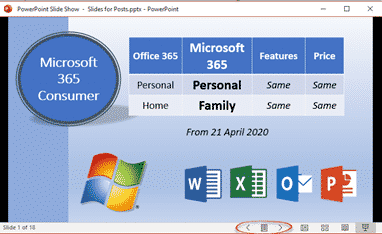
PowerPoint presentations in a window not full screen
PowerPoint presentations don’t have to be full-screen, that’s the default and normal way to show a deck, but a window option is also there. A windowed presentation lets you display the slides in other software like virtual cameras or desktop capture. Go to Slide Show | Setup Slide show and choose ‘Browsed by an individual […]