You’re not locked into the PivotTable sorting options provided by Microsoft. Excel lets you arrange a PivotTable into any order you like. Right-click on a PivotTable column and choose Sort | More Sort Options | Manual. How to Drag and Sort It’s not obvious how to select an item (row
Sometimes you want to sort a list or PivotTable in a special way that doesn’t fit the usual ‘A to Z’ or number order. The most common need for this are days of the week or months in a year. Neither of those orders make sense to a literal computer.
You still want to explore more Excel PivotTable sorting, there are some additional options like Click More options button on the Sort dialog box. The More Sort Options dialog box appears for your Sorting list of the Pivot Table. Let’s see what these additional features can do for you: As
Excel allows you to sort a PivotTable in alphabetical order or from largest to smallest values. They are similar to the standard Excel sorting options but worth looking at separately because there are automatic sorts, custom sortings and a manual sorting option. Quick PivotTable Sort Sort the PivotTable by right-click
Next Wednesday, Australia gets the results of their Same Sex Marriage survey with the details available to everyone with Excel. Here’s how to get the survey results, prepare for the announcement and when it’ll happen. We know most people won’t be interested in this singular Aussie exercise in democracy (don’t
By default, PivotTable provides custom name such as “Sum of Amounts” or Count of Numbers” etc when you add a field to the table. You may not be always happy to use these default custom names for your PivotTable, so feel free to modify the headings to something you like.
Moving or swapping fields around in a PivotTable is both amusing and addictive at the same time. You cannot stop yourself from rearranging your data in different ways. Each time you move a field, the Pivot Table will restructure to the new field configuration and you see the same data
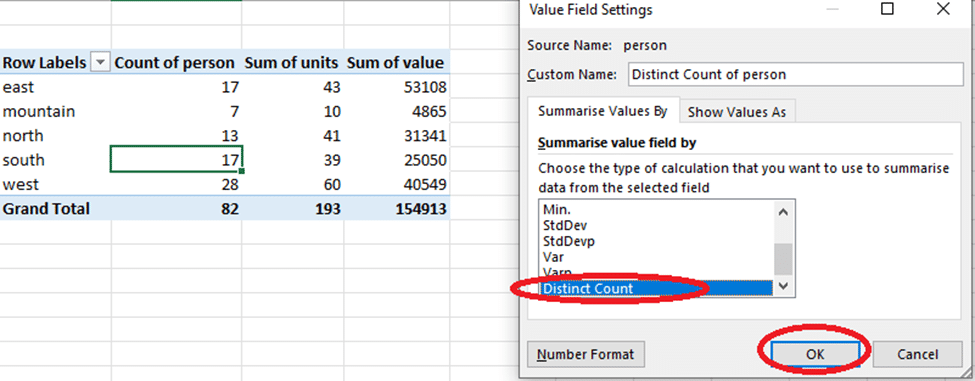
You will always find Excel either summarizing your data by adding the values together (SUM) or Counting the number of items. Nobody is stopping you from changing the type of calculation that your work demands to include averages, maximum, minimum, standard deviation and others. Change the calculation from the Value
Apple has introduced a new image and video format for iPhone and iPad, here’s how to handle it in Microsoft Office documents. .HEIC image files are made by default in some Apple devices with iOS 11. Microsoft Office and Windows don’t support the new format yet but there’s workarounds available
OneDrive will automatically save past versions of an Office document, here how to access those revisions quickly. The advertised way to view a document history is through the Activity button, next to Share on the top right. In Office 2016 for Windows, Office 365. The Activity pane shows a list
A recent Office addition is ‘Shared with Me’, a list of the documents you’ve been invited to collaborate on with others. It’s available in Office 2016 Windows/Mac and the iPad, iPhone and Android Mobile apps. According to Microsoft ‘Shared with Me’ ” lets you see the files others have shared
Office 2016 for Mac (Office 365) has the same document sharing options as Office for Windows but they look a little different. In fact, Office for Mac has an additional sharing option not available in Windows. Just like Office 2016 for Windows, Office 2016 for Mac has a Share button
It’s always been possible to email a document for reviewing or editing. Modern versions of Office make that easier by letting you email from the document directly, instead of an email program like Outlook. Instead of opening your email to send an attachment, click on Send as an attachment from
The Share pane in modern Office is fine within an organization or with people who are familiar with document collaboration. But what if you want to share a document link with more detail in the email or using a non-email method like Instant Messaging? Well, you want to get just
Ever since Microsoft added shared, collaborative documents via OneDrive, they’ve had problems with saving and sign-in. Here’s how to deal with some of those persistent bugs. These bugs can happen in Word, Excel, PowerPoint or OneNote. Most commonly with documents saved to OneDrive but also Dropbox or other cloud storage.
It was a small but long awaited addition to Excel for Windows but now it’s disappeared? Why did the Chart option “Show #N/A as an empty cell” go missing? There was a small cheer in the Excel charting community when Microsoft put this extra option in the Chart | Hidden
A list with groupings (like Product Type, Country, Region or Staff pay level) can become a nested PivotTable. The sub-totals are created with + – signs to show/hide the groupings. We’re using the same source list as in our Basic PivotTable and Two-dimensional PivotTable examples. Doing that is simple, just
We started with a simple Excel PivotTable, now let’s move on to a multi-column or two dimensional PivotTables. They aren’t a lot more complicated than a basic PivotTable, just add a few more fields. We’ll start with the same sales list that we used for our PivotTables 101 article. This
PivotTables really are great and we’re not just saying that because it was one of Bill Gate’s favorite features. The original PivotTable feature was clumsy and difficult so you’re forgiven for trying them and giving up in disgust. Mayurakshi wants to show you some of the nifty parts of PivotTables
Make smarter decisions with Excel’s tables and lists. Excel is a great place for comparison shopping or deciding which product to buy. Unlike Word or OneNote, Excel has tools to sort, filter and do calculations to help you narrow down many choices to just a few or one. In this
Excel 2016 for Windows is getting some welcome ‘under the hood’ performance improvements. It’s great to see some work on the fundamentals of Office instead of the apparent focus on flashy new features that look great in demonstrations. Word and Outlook teams: please follow suit. The Problems The aim is
We’re delighted to announce that our champion Office 2016 ebook has been updated, yet again, to include new and added features for the main Windows version of Microsoft Office. A bit like Office itself, Office 2016: the real startup guide is updated to keep pace with the improvements in Office
Microsoft has released another version of Office 2016 for Windows to be tested by insiders. This one is bought and installed from the Windows 10 Store. Naturally Office-Watch.com dived in to check it out. At the moment, only some Windows Insiders and users of Windows 10S can get Office in
If you love digging into US election details you’ll love these spreadsheets with US Presidential Election results, by County and Party from 1836 to 2016 Unleash your inner Nate Silver, see how your county or state voted over the years, starting at Google Docs There are tabs for each state