Office 2021 is the personal and small business ‘perpetual licence’, non-subscription version of Microsoft Office. For Windows and Mac.
Office LTSC (Long Term Servicing Channel) is the volume licence ‘perpetual licence’, non-subscription version of Microsoft Office for organizations, companies and governments. Also for Windows and Mac.
The features in Office 2021 and Office LTSC are very similar, if not the same.
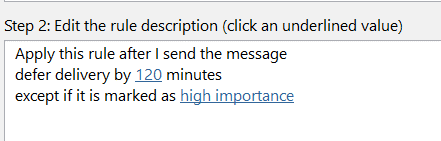
Delay sending a message the easy way in Outlook
Do you ever wish you could take back an email that you sent too soon or with a mistake? You’re in luck because Outlook lets you delay sending messages for a certain amount of time after you hit Send. It’s like having a second chance to prevent a mistake. We’ll show how it’s done with […]
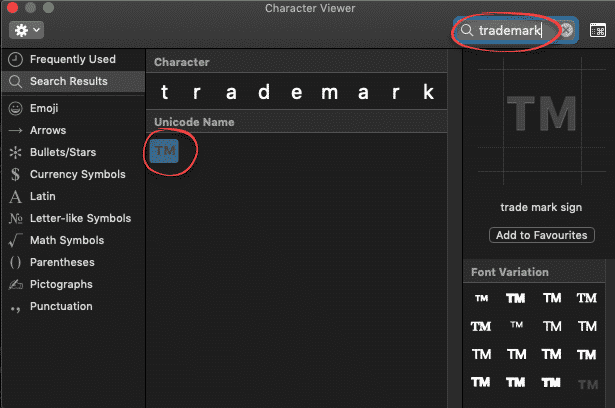
Trademark ™ symbol in Word, Excel, PowerPoint and Outlook
Type the Trademark ™ TM symbol as text and icon into Microsoft Word Excel PowerPoint or Outlook. Both in Office for Windows and Office for Mac. Trademark ™ TM symbol is, strictly speaking, called the Unregistered Trademark symbol. Its counterpart is the Registered Trademark ® Trademark in Word and Outlook The Trademark ™ sign has an […]
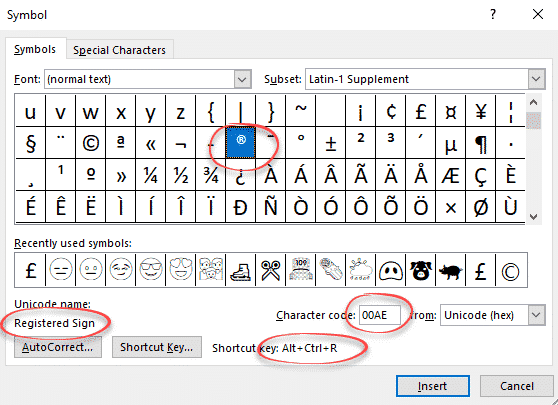
Registered Trade Mark ® symbol in Word and Office
How to insert the Registered Trade Mark ® symbol as text or icon into Microsoft Word, Excel, PowerPoint or Outlook. Both in Office for Windows and Office for Mac. Registered Trade Mark ® not to be confused with the Unregistered Trade Mark ™ symbol. Registered Trade Mark ® in Word and Outlook The Registered Trade Mark […]
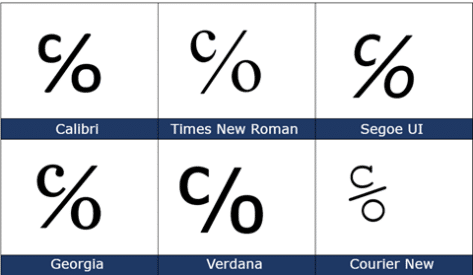
Care of ℅ symbol in Word, Excel, PowerPoint and Outlook
The Care of ℅ symbol can be typed into Microsoft Word, Excel, PowerPoint or Outlook. Both in Office for Windows and Office for Mac. Care of ℅ symbol is one of those useful symbols you’ll never see on a keyboard and have to go hunting for. ℅ is used on envelopes and addresses, it refers to […]

Microsoft Office photo editing with Apollo 8’s Earthrise
As a quick example of what’s possible, here’s a quick look at some photo editing options in Microsoft Office, Word, Excel, PowerPoint or Outlook emails. Since it’s Christmas, we’ll use one of the famous Apollo 8 Earthrise images. We’ve already talked about how Apollo 8’s Earthrise, as we know it, is a cropped, rotated and […]

The Joys of being a late Office adopter
Better to stick with a stable, known Microsoft Office instead of monthly updates with new and changed features. That rational customer approach isn’t understood at Microsoft who push the regular Microsoft Office 365 changes on the assumption that it’s a universal good which suits all customers. Brian X Chen in The New York Times has […]

Why updating Office is like Star Trek’s Kobayashi Maru
Updating Office or Windows isn’t an easy choice, you’re taking a risk no matter what you choose. Star Trek fans know about these ‘no win scenarios’ aka ‘Kobayashi Maru’ At Office-Watch.com we’re often asked what to do about updating and, frankly, it’s hard for us to give a simple answer. Like any trainee Starfleet officer, […]
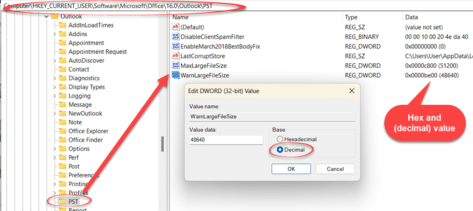
Fixing and increasing Outlook PST/OST size limits
Outlook for Windows data files (PST or OST) start with a maximum size of 50GB but they can be much, much larger if necessary. Here’s how to do it as we make sense of Microsoft’s out-of-date advice. Outlook for Windows use PST and OST files to save email, calendar, contacts and a lot more. These […]

Office 2024 coming to replace Office 2021
It seems the next version of Office will be out in 2024. If the latest leak from Microsoft holds up, Office 2024 will replace Office 2021. Some images posted on Twitter (X) by techosaurusrex show a screen from Word 2024 as part of a “Office 2024 LTSC Professional Plus 2024” bundle. LTSC means ‘Long Term […]

Solved! How to connect shapes in Word
There’s a way for Microsoft Word to connect shapes with lines or arrows that remain connected when moved. We’ll explain the trick and why it’s needed in Word and Outlook but not other Office apps. As we’ve already explained, in Excel, PowerPoint and Publisher, you can connect shapes with lines or arrows that change when […]

Connect two Office Shapes with lines or arrows
Microsoft Office can make drawings with linked lines or arrows between shapes that automatically change if the shapes are moved. Here’s how Office connectors work and the tricks to make connecting shapes work better. A little known but really useful part of the Insert | Shapes is the ability to link objects with lines that […]

Typing Türkiye in Word, Outlook, Windows or Mac
Türkiye is now the preferred name for the country Turkey. Here’s how to easily type Türkiye with the umlaut in Microsoft Office, Word and Outlook on Windows or Mac. It’s also a good example of the limits or traps in Word’s Autocorrect. A common trick for a change of name is AutoCorrect, e.g. anytime you […]

Fast umlaut ä ë ï ö ü in Microsoft Word and Office
Once you know the ‘secret’ shortcuts, it’s easy to type the umlaut vowels ä ë ï ö ü Ä Ë Ï Ö Ü in Word and Outlook but, alas, it’s not the same in Excel or PowerPoint. There are alternatives in Windows and Mac if you’re not using Word. There’s also a stand-alone ¨ umlaut […]
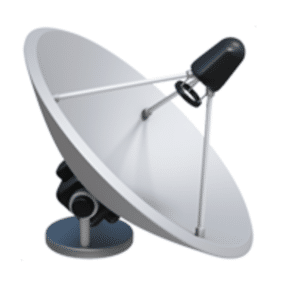
Satellite Antenna 📡 emoji in Word, Excel, PowerPoint and Outlook
Type the Satellite Antenna 📡 symbol/emoji into Microsoft Word, Excel, PowerPoint or Outlook. Both in Office for Windows and Office for Mac. Satellite Antenna or Dish 📡 symbol can be used for modern television, radio, GPS or wireless broadcasting generally. Can be used with the Satellite 🛰 emoji or icon. How Satellite Antenna 📡 looks […]

Ten tips for better Outlook emails
The Washington Post has a ten-tip etiquette guide to which we’ve added our Microsoft Office & Outlook specific suggestions. Check out Danielle Abril’s article at The Washington Post. Her recommendations are necessarily general so we’ll add more technical and specific comments for Office users. Consider not sending an email So many other options available beyond […]
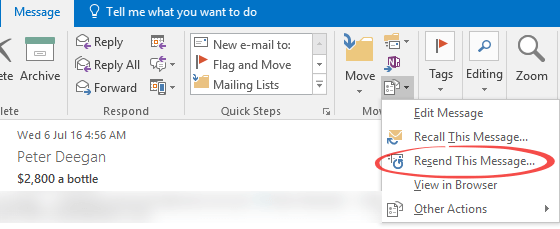
Resend email – Peter’s favorite (hidden) Outlook feature
There’s a really useful Outlook (Windows and Mac) feature that Peter (our Grand Poo-bah or Editor in Chief) uses regularly even though it’s hidden away in Outlook menu: Resend. ‘Resend this message’ opens a new copy of a sent message with all the same details filled in (To, CC, Bcc, Subject, Body and Attachments). It’s […]









