Office 2021 is the personal and small business ‘perpetual licence’, non-subscription version of Microsoft Office. For Windows and Mac.
Office LTSC (Long Term Servicing Channel) is the volume licence ‘perpetual licence’, non-subscription version of Microsoft Office for organizations, companies and governments. Also for Windows and Mac.
The features in Office 2021 and Office LTSC are very similar, if not the same.

Does an Office licence work for two users on a computer?
Microsoft Office rules might let two users or more use the same copy of Office on a computer. It depends on which type of Office you have on a Windows or Mac computer. Office can work for multiple separate users on the one computer. Most commonly, there are separate Windows or Mac logins for the […]

Outlook Profiles, important, useful but little known
Outlook profiles is one of the most important but least known parts of the program. Profiles can be very useful, sometimes essential to getting Microsoft Outlook working. An Outlook profile is a group of settings for connecting to the email server, and where to store the emails and other data. A profile is created when […]

Renaming an Outlook Profile
Outlook for Windows doesn’t have a direct way to rename an Outlook Profile but it’s still possible. Outlook for Mac, on the other hand, can rename a profile from the Manage Profiles list. Properly label a Profile instead of using the one or two word names Microsoft defaults to. This is a Windows registry change […]

Excel Function Keys explained
Function Keys in Excel are a convenient and quicker way of doing tasks by using keyboard instead of mouse. Here’s the Excel function keys (F1 to F12) and their many tricks. F1 – Help, Ribbon, Chart, new sheet F1 – Displays the Excel Help pane Ctrl +F1 – Displays or hide the ribbon of Excel. By hiding […]
Having Microsoft Office problems? Try these tips first
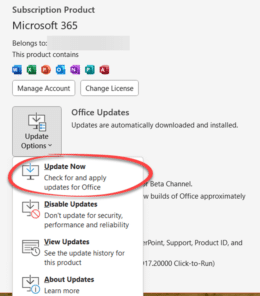
If you’re having trouble with Office for Windows, try these tips first. They might fix the problem or help narrow down the cause. You’ll often get these suggestions from Microsoft Support or forums. They are things to try before asking for help with a Microsoft Office problem for two reasons: Support staff might make these […]

Fixing a broken Reuse Slides feature in PowerPoint
What to do if you get the “Sorry, something went wrong” error message trying to use PowerPoint’s Reuse Slides feature. This error message might appear if you’re trying to use PowerPoint’s Reuse Slides feature. It seems to happen only for non-business users (for example Microsoft 365 Family/Personal plans). The current error message is both non-specific […]

Reuse slides in PowerPoint, the good and the annoying
There’s a faster way to clone or reuse slides from existing PowerPoint presentations. Reuse Slides lets you pick a slide and copy it in a flash. Which sounds great unless you’re an unlucky person who hits a useless and unhelpful Microsoft error message. Reuse Slides is mostly promoted as a tool for organizations with shared […]

New way to switch apps in macOS Ventura and Office for Mac
The 2022 ‘Ventura’ release of macOS has a new way to switch between apps called ‘Stage Manager’. It works well with Office for Mac, making it easier to see what’s open and available. But Stage Manager has its frustrations in this first release. Stage Manager appears on the left side, showing the most recently used […]

Make your Word document more readable
Word’s Readability check is a great extension to the familiar Microsoft Word Spelling & Grammar. Word can check the complexity of your writing and give you an idea of whether your text will be readable, meaning understood, by your target audience. We’ll show you how to see Word’s Readability Statistics, what they mean and how […]
Outlook Print Calendar Options -a Daily/Weekly/Monthly plan on paper
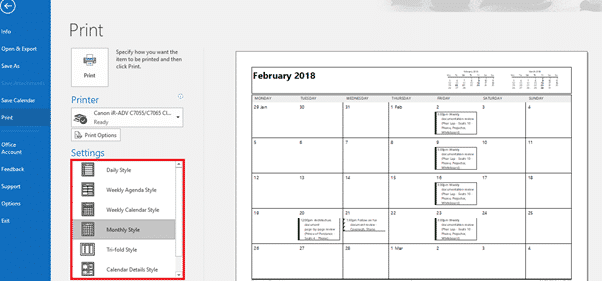
Outlook provides you with many printing options to put your calendar onto real, physical paper or save to PDF. Print and customize your calendar information, be it your daily schedules, weekly schedules or monthly plans. It also allows you to print specific dates you want to. It might seem ‘old fashioned’ but, printed calendars have […]
How to print a blank calendar from Outlook
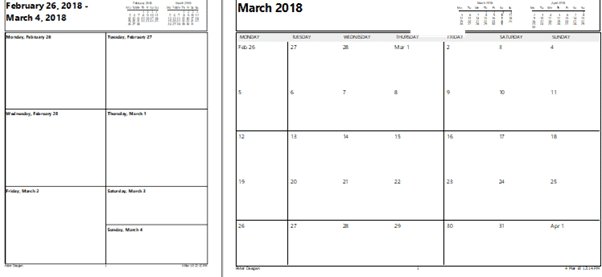
Here’s how to quickly print a blank calendar from Outlook with no appointments, notes etc – monthly, weekly or a single day. Use a blank printout to roughly plan a week or month in a way not possible in Outlook. Or save the printout to a PDF that you can write on with a virtual […]

Outlook’s upside-down or flipping image rotation problem
Why does the same picture appear rotated sideways or flipped in Outlook for Windows/Mac but right side up elsewhere? It’s an image annoyance in older versions of Microsoft Outlook which we’ll explain. Outlook for Windows or Mac lets you preview a picture by clicking on the attachment icon but sometimes the preview is the sideways […]
Scale text, larger or smaller, in Microsoft Word
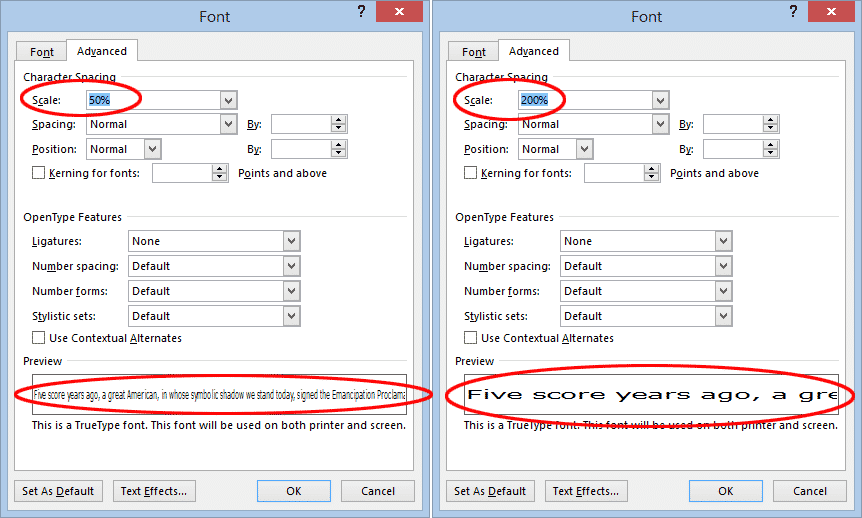
Scaling Text in Word is another Microsoft Word text effect to make the text larger or smaller. Specifically, the Scale option stretches or contracts the horizontal width of the characters and spaces between. Here’s an example of normal, 150% and 66% scaling. To change the scaling of text in Word, select the text you want to change and either: On the […]

Chemistry in Microsoft Word with Chem4Word
Chemistry add-in for Word or Chem4Word is a way to “to insert and modify chemical information, such as labels, formulas and 2-D depictions, from within Microsoft Office Word” and works with Word for Windows including Word 365, Word 2021, 2019 and earlier. The Chemistry add-in started as a Microsoft Research project back in 2010 and […]
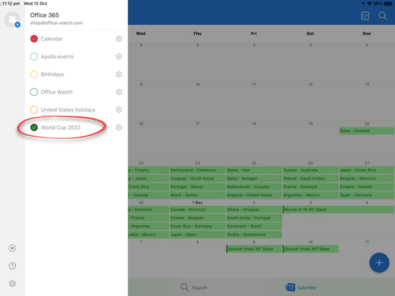
Outlook for Mac: Add 2022 FIFA World Cup calendar
Here’s how to keep track of your 2022 World Cup football team and when the live broadcasts will be in your time zone – all by adding a calendar to show in Microsoft Outlook for Mac, iPhone or iPad. Here’s all the 2022 World Cup fixtures in Outlook, on the left we’ve added two time […]

Put 2022 World Cup fixtures in your Outlook calendar
Don’t miss a match in the 2022 FIFA World Cup (soccer) in Qatar. Here’s how to keep track of your team and when the live broadcast will be in your time zone – all by adding a calendar to Microsoft Outlook. Where to get reliable match details and add them to Outlook. There are 55 […]









